You can write code without a code review tool. But why would you, when the right one moves you faster and keeps you confident in what ships?
Plenty of teams still lean on manual reviews or developers checking their own work. According to Aikido's 2026 State of AI in Security & Development report, 73% of teams do. Human review will always matter, but on a large codebase it's slow and easy to miss things, which is exactly where automation earns its place. And if AI is already helping you write code faster, letting it help review that code is the obvious next step.
The tools worth using now do more than flag style nits. They suggest fixes, catch security vulnerabilities, and read a change against the rest of the repository to spot what it might break. We tested the leading options and broke them down by who they actually fit.
Below you'll find an overview of the top tools, then the best picks for startups and for enterprises. Skip to whichever fits:
- 5 Best Code Review Tools for Agile Teams and Startups
- 3 Best Code Review Tools for Enterprise Development Teams
What Are Code Review Tools?
Code review tools help development teams catch bugs, security gaps, and anything that drifts from their standards before it ships. In 2026 that means more than finding bad code: they use AI to suggest fixes, flag vulnerabilities, and analyze patterns across repositories to catch problems before they reach production. Because most of them plug into your version control and IDEs, reviewers comment, approve, and generate insights without leaving the environment they already work in.
How To Choose Code Review Tools for Your Workflow
The right choice depends on your workflow, your stack, and how your engineers collaborate. Six things to weigh:
1. Integration with your existing stack. A good tool fits your ecosystem, whether that's GitHub, GitLab, Bitbucket, or a self-hosted CI/CD pipeline, without asking you to change how you work. If it needs weeks to onboard, keep looking.
2. AI assistance and automation. The useful tools catch logic flaws, suggest improvements, and cut review fatigue by learning your codebase and context rather than running static rules alone.
3. Customization and context. Every team has its own conventions and architecture. The best tools let you encode those rules so reviews stay high-signal.
4. Collaboration experience. Look for threaded discussions, inline comments, and asynchronous review, which matter most for distributed teams.
5. Scalability and performance. As repositories grow, the tool has to handle large diffs, monorepos, and concurrent pull requests without dragging your pipeline.
6. Support for security standards. Teams review for compliance and security posture now, not just clean syntax. The right tool enforces frameworks like the OWASP Top 10, CWE, and CIS Benchmarks, or your own internal standards, and flags insecure patterns, dependency risks, and policy violations as part of the review so they don't slip into production.
Top 7 Best Code Review Tools of 2026
1. Aikido Security
Aikido Security reviews every pull request and secures what's in it, across three products that work at different depths. Code Quality handles the day-to-day review. Deep PR Review runs full AI reasoning on every pull request as it's opened. Code Security Audit applies that same reasoning to code you've already shipped. All three run across your version control and IDEs, reading each change against the wider codebase rather than the diff alone.
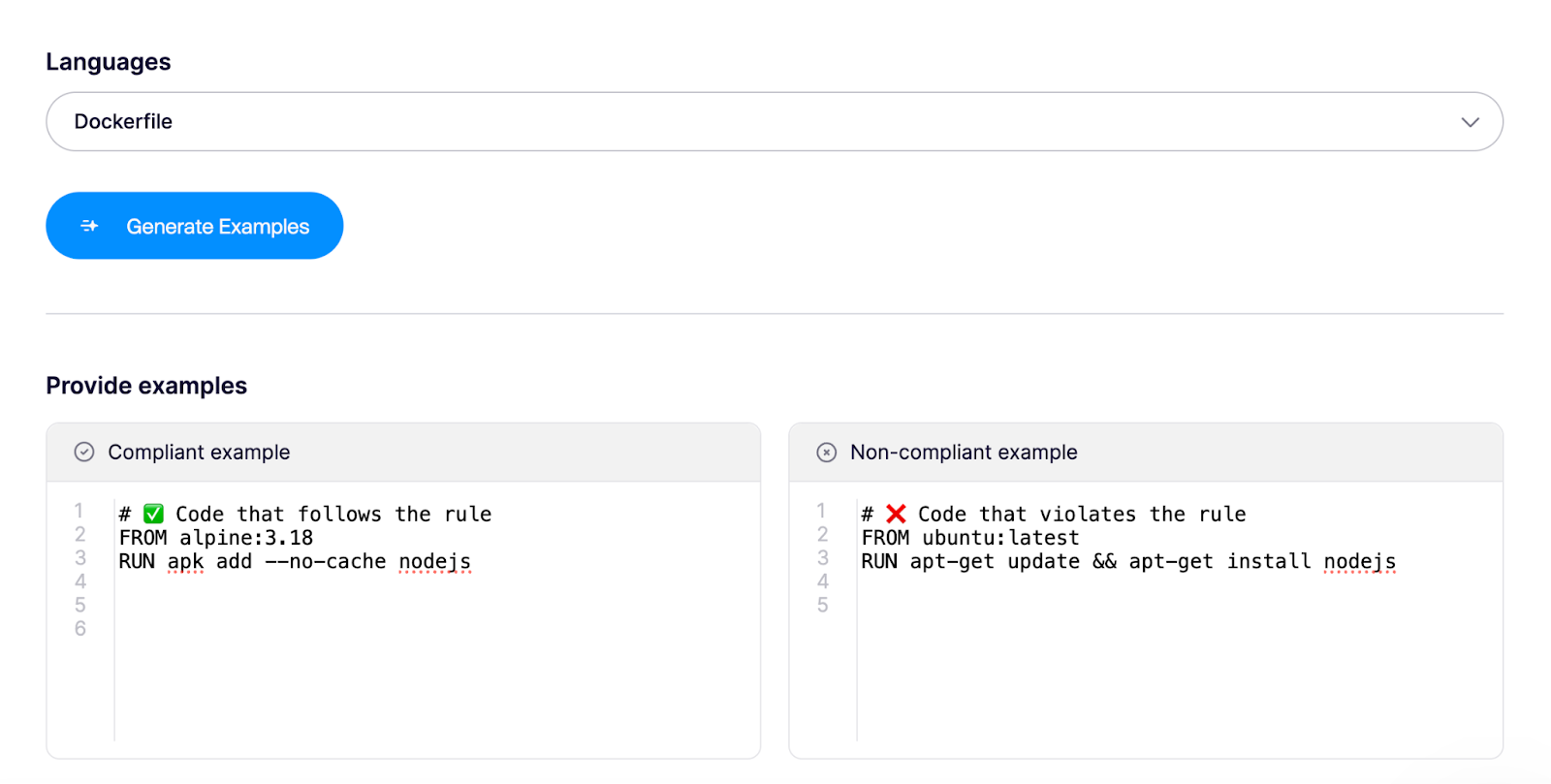
Code Quality produces inline PR comments and one-click fixes on every change, with custom and predefined rules you enforce across the team. Connect a repo and it runs on smart defaults, no config. It learns your codebase from past reviews, so the comments developers get are worth reading. Say you want a rule that allows only Alpine base images in Dockerfiles: you create it by giving compliant and non-compliant examples, and Code Quality applies it on top of industry best practices.
For example, if want a rule that says:
Allow only Alpine base images in Dockerfiles as base images
You can simply create one by giving compliant and non compliant examples so Aikido code quality knows what to look for aside from industry best practices.
Deep PR Review reads each pull request the way a senior engineer with unlimited time would. Before it flags anything, it takes in your whole codebase, related repositories, existing static results, and the comments already on the change. That context is what lets it reason about business logic and catch access-control bugs like IDORs while the pull request is still open, well beyond what a linter or a fast human pass will see.
Code Security Audit turns that same reasoning on code you've already shipped, following data flow and permission checks across services to find where the logic breaks down. It chains individually low-severity bugs into the single privilege-escalation path they add up to, the kind of multi-step exploit an attacker would actually build. Every finding shows what's exploitable and how someone would reach it, with a full reasoning trace.
Why developers like Aikido:
Every organization writes code differently, and Aikido learns yours. You teach it your team's coding standards, best practices, and exceptions, so reviews reflect how your team actually works. You can add context like:
"We store dates as UTC in the database but always display them in the user's local time; all conversion logic is in utils/timezone.js, so don't flag timezone conversions as redundant."
You can tune that context per repository too. Because Code Quality is system and language agnostic, you review, comment, and approve changes right inside your environment.

Pros:
- AI review that reasons about business logic and access control, catching IDORs and broken permissions a linter or fast human pass misses, with fix guidance inline.
- Custom rules in Opengrep format that hold consistently across hundreds of repos, so the same standards apply to one service or an estate of them.
- False positives reduced by up to 95% through intelligent triaging.
- IDE plugins for VS Code, Cursor, Windsurf, JetBrains, Android Studio, and Visual Studio, so feedback reaches developers where they already work.
- Review doesn't stop at the pull request: dependencies, cloud, and runtime are covered in the same platform.
- Flat-rate pricing with 10 users included and no hidden fees for support, usage, or lines of code.
Customer reviews:
- “Game changing tool for shift left security mindset” – A G2 reviewer
- "Rapid setup (minutes), human support (no bots) and a fantastic solution." – A G2 reviewer
- “Aikido saves hundreds of hours of developers time by catching and filtering” – Gartner
- Many note that it significantly reduces review fatigue and helps junior developers learn best practices through detailed explanations in PRs.
In nutshell Aikido saves you time and cost as you would want your code review to.
{{pentest}}
2. Graphite
Graphite is a platform designed to simplify code reviews, especially for teams using GitHub. Its stacked pull request feature lets teams break complex changes into smaller, more manageable updates for simpler reviews and faster approvals.
The platform offers tools to minimize context switching and maintain focus during the review process.
Why developers like Graphite:
Developers gravitate toward Graphite because it introduces advanced review mechanics without disrupting existing Git-based workflows.
Its defining feature “stacked pull request workflow” — allows developers to break large features into smaller, reviewable chunks. Instead of submitting one massive PR, Graphite lets you create incremental changes that build on each other using commands like gt create, gt modify, and gt sync.
Pros:
- Offers stacked PRs to break down complex changes, speeding up approvals.
- Shows a side-by-side view to keep everything in one place, reducing distractions.
- Features a simpler design that quickly highlights bugs and potential issues.
- Includes merge checks that verify quality standards before merging code.
- Integrates smoothly with GitHub for easy use of existing tools.
Cons:
- Stacked PRs may be a learning curve for teams used to traditional Git workflows.
- Limited compatibility outside GitHub.
- A smaller community means fewer third-party integrations.
Customer reviews:
“I’ve enjoyed using Graphite so much that I wrote my own Emacs integration for it” - Graphite case study.
Pricing: Free for personal projects, $20 per user/month upwards for paid plans.
3. CodeRabbit
CodeRabbit is an AI-driven code review tool that aims to streamline the review process for development teams. It provides automated feedback, fastcollaboration, and customizable rules to meet project standards. With Pull request, IDE and CLI integration, CodeRabbit meets developers where they are at in producing code.
Why developers like CodeRabbit:
Developers appreciate CodeRabbit for its precision and signal-to-noise ratio. Also its GitHub-native UX makes it feel like an extension of the PR workflow, not an external reviewer.
CodeRabbit uses advanced machine learning models trained on a vast dataset of code to provide highly accurate and relevant feedback. However, it is designed to complement, not replace, human review.
Pros:
- AI-powered reviews deliver line-by-line feedback, helping spot bugs and suggest improvements.
- Step-by-step reviews catch issues early by analyzing code changes with every commit.
- Committable suggestions let developers make changes directly within the tool.
- Customizable review rules set to project-specific standards.
- GitHub integration ensures a smooth workflow.
Cons:
- Pricing may not suit small teams or individual developers.
- Suggestions can sometimes lack enough context to be fully reliable.
- Performance issues, like occasional slowdowns, can interrupt the review process.
- The interface may feel unintuitive for some users, making navigation tricky.
Customer reviews:
- “Developers highlight CodeRabbit’s clean GitHub integration, context-aware AI feedback, and ability to catch subtle logic bugs that conventional linters miss.” – G2 review
- A user on Apidog tried CodeRabbit and found its learning curve to be gentle
Pricing:
Free for PR summarization, $15 per user/month upwards for paid features.
4. SonarQube Server
SonarQube is one of the leading code review tools that helps developers keep their code clean and secure. It highlights issues like weak points, code smells, and technical debt across many programming languages.
With easy integration into CI/CD pipelines, it maintains code quality at every stage of development. SonarQube’s clear dashboards and reports make it simple for teams to track progress and focus on key improvements.
Why developers like SonarQube:
Developers love and trust SonarQube for two main reasons:
- It is a battle-tested static analysis tool. It's been around the block for more than a decade.
- It’s open source at its core. That openness means teams can self-host, customize, and extend it to fit their own workflows and compliance needs without vendor lock-in.
Pros:
- Identifies bugs, vulnerabilities, and code smells in various languages.
- Integrates with CI/CD tools like Jenkins, Azure DevOps, and GitLab CI for automated checks.
- Customizable quality gates reduce technical debt by setting merge/deployment rules.
- Dashboards track trends and highlight areas for improvement.
- Supports over 25 programming languages.
- Open-source with a large community contributing plugins and extensions.
Cons:
- Too complex for smaller projects or teams.
- Setup requires time and technical expertise, especially for self-hosted versions.
- Some features are limited without CI tool integration.
- Can be resource-intensive, requiring stronger server infrastructure for large projects.
Customer reviews:
SonarQube reviews are riddled with mixed feelings. Some swear by it, others curse at it:
- One Reddit user said: “SonarQube is complete dog sh*t.”
- A software advice reviewer said: “Perfect for detecting unit test coverage”
You decide.
Pricing:
- Free with limited features for developers that want to try.
- Team plans are paid and start at $32 per month.
5. Snyk
Snyk is a developer-friendly security tool designed to identify and address vulnerabilities in code and dependencies. It integrates with popular tools offering real-time scanning and open-source analysis to raise project security. With a simple design and proactive approach, Snyk simplifies managing vulnerabilities for teams of all sizes, though larger organizations might find its features lacking.
Why developers like Snyk:
Developers like Snyk because it brings security directly into the development workflow.
Pros:
- Works smoothly with tools like IDEs and CI/CD pipelines to fit existing workflows.
- Focuses on open-source security by analyzing dependencies.
- Real-time scanning keeps projects secure by catching issues quickly.
- Simple interface makes onboarding fast and easy, even for new teams.
Cons:
- Can generate false positives, which may create unnecessary alerts and slow down processes.
- The cost can be high for larger teams, especially those requiring extensive use.
- Reporting features might lack the depth needed for detailed insights and analytics.
- Some integrations with third-party tools may feel limited.
Customer reviews:
Snyk reviews are riddled with mixed feelings. Some swear by it, others curse at it:
- One Reddit user said: “We use Snyk in our pipeline and it reports so much stuff that the devs just said f*ck it and set allow_failure: true so they could continue to do builds.”
- Another one asks if it's worth the price.
Pricing:
- Free for individual developers
- Team plan starts at $25 per user/month with a minimum of 5 users and maximum of 10
6. Codacy Quality
Codacy is a flexible tool designed to help teams improve code quality with automated reviews and support for many programming languages.
It positions itself as a one-stop tool for enforcing quality, security, and maintainability across pull requests and branches. And it works well for teams looking to adjust code analysis to their needs.
However, it does have some drawbacks, like occasional false alerts and high cost at scale, which might make it less favourable for some users.
Why developers like Codacy:
Developers appreciate Codacy for its broad language and rule support as teams with multiple tech stacks can apply consistent quality checks across projects without juggling separate tools.
Many users highlight that Codacy accelerates feedback loops and helps enforce quality at scale.
Pros:
- Offers a clean, easy-to-navigate interface that suits teams of all sizes.
- Works across various programming languages.
- Allows teams to adjust code analysis rules to fit specific project needs.
- Integrates with CI/CD tools like GitHub and GitLab for real-time feedback.
- Automates reviews by commenting on pull requests.
Cons:
- Doesn’t support pre-commit checks locally.
- Occasionally flags false positives, causing unnecessary alerts.
- Pricing can be high for larger teams.
- Some features lack detailed guidelines.
- On-premise versions can face occasional performance issues, while the cloud version is more reliable.
Customer reviews:
Most of the public Codacy reviews are 2 years old on average, but here they are:
- “The automated code review pops up in my mind while thinking about the sides I like much.” – Gartner peer insights
- “I enjoy the quality gates” – G2 reviews
Pricing:
- Free for open source projects and single developers
- Team plans start at $21 per user/month
7. CodeAnt AI
CodeAnt AI combines automation with flexibility, offering tools to detect, fix, and optimize code efficiently. Its integrations and real-time feedback make it a strong option for teams aiming to improve productivity.
Why developers like CodeAnt AI:
Developers are drawn to CodeAnt AI because it offers end-to-end AI-augmented code review combining code quality, security, and PR-level context all in one platform.
Because its AI engine understands abstract syntax trees (ASTs) and connects code context across modules, it can catch issues that isolated linters or rule-based scanners often miss.
Pros:
- Detects and automatically fixes common issues, saving time on code reviews.
- Works with popular IDEs and CI/CD tools like GitHub and Bitbucket.
- Provides immediate feedback during pull requests.
- Lets users adjust analysis rules to match specific coding standards.
- Optimizes code to support scalability for applications that anticipate growth.
Cons:
- Advanced features come at a cost.
- Focuses on cloud-based operations, limiting offline or local analysis options.
- Complex guidelines make it hard to use all the features fully.
- Occasional false positives may occur.
Customer reviews:
“CodeAnt.ai has fundamentally improved how we approach code reviews.” – G2 reviewer.
Pricing:
- Basic plan starts at $12 per user/month
- Premium plan starts at $25 per user/month
8. Kodus
Kodus is an open-source AI code review tool built for engineering teams that want more control over how automated reviews work. Instead of locking teams into a single model or a fixed review style, Kodus is model-agnostic and supports Bring Your Own Key, so teams can choose the LLM provider that fits their cost, privacy, and performance needs.
Its AI reviewer, Kody, reviews pull requests based on your team’s own rules, standards, architecture, and workflows. Teams can define custom review guidelines in plain language, sync existing rule files from tools like Cursor, Copilot, Claude, and Windsurf, and keep reviews aligned with the conventions they already use.
Why developers like Kodus:
Kodus is a strong fit for teams that want AI-assisted code review without giving up control. It works directly in pull request workflows, supports major Git providers like GitHub, GitLab, Bitbucket, and Azure DevOps, and can post inline comments based on the specific standards your team defines.
Because Kodus is open source and supports BYOK, teams can manage their own AI costs and avoid being tied to a single vendor’s model choices. That makes it especially useful for teams that care about flexibility, transparency, and keeping AI review aligned with internal engineering practices.
Pros:
- Open-source AI code review tool.
- Model-agnostic, with support for Claude, GPT, Gemini, Llama, and OpenAI-compatible endpoints.
- Supports Bring Your Own Key, giving teams more control over model choice and AI spend.
- Lets teams define custom review rules based on their own standards.
- Works with GitHub, GitLab, Bitbucket, and Azure DevOps.
- Can support self-hosted or hosted setups, depending on the plan.
- Privacy-focused positioning, including not storing source code or using customer code to train models.
Cons:
- Teams using BYOK need to manage their own model provider setup and token costs.
- Smaller teams may need time to define useful custom rules before getting the best results.
- As a newer player compared with legacy review tools, some enterprise buyers may want to validate governance, reporting, and support needs before adopting it at scale.
Pricing:
Kodus offers a free Community option, a Teams plan listed at $10 per developer monthly or $8 per developer annually plus token costs, and custom Enterprise pricing. BYOK is listed for Community and Teams plans.
Other Honourable Mentions
9. Codebeat
10. Codegrip
11. Deepsource
12. CodeQL by GitHub
13. Qodo Merge
14. Greptile
15. Devlo.ai
16. Korbit.ai
17. Codiga
18. Gerrit – Fully Open Source
5 Best Code Review Tools for Agile Teams and Startups
Agile teams and startups move fast. From shipping features daily to juggling multiple priorities with limited resources. The code review tool they use must help move fast without breaking the bank.
Also these tools should be quick to set up (founders don’t have time for week-long deployments) and ideally scale with the company’s growth.
Flexibility is also key as a startup might pivot tech stacks or go from on-prem to cloud overnight, so a code review tool that covers multiple environments is a plus.
Here are great options for young companies:
- Aikido Security
- Graphite
- CodeRabbit
- Codacy
- CodeAnt AI
3 Best Code Review Tools for Enterprise Development Teams
Enterprise software development comes with scale, complexity, and strict compliance needs. Code review tools must go beyond bug detection to support governance, security, and cross-team coordination.
Key requirements include:
- Centralized management and policy enforcement for consistent quality standards across teams and repositories.
- Scalability and performance to handle large monorepos, parallel reviews, and high commit volumes.
- Governance and compliance with built-in audit trails and support for frameworks like SOC 2, ISO 27001, and GDPR.
- Security and access control with SSO, SAML, and role-based permissions.
- Integration with enterprise systems such as Jira, Azure DevOps, and CI/CD pipelines.
- Multi-language support to ensure consistent analysis across diverse tech stacks.
- Advanced analytics and reporting to track review metrics and improve engineering efficiency.
In essence, enterprise code review tools must combine governance, scalability, and security while fitting seamlessly into existing workflows.
Here are the top 3 enterprise code review tools:
- Aikido Security
- SonarQube
- Snyk
Find the best AI tool for code review with Aikido Security
Code review has always been the heartbeat of good engineering. And also one of the most hated processes. Between context switching, nitpicking, and endless comment threads, reviews can slow down even the best teams.
Aikido’s code quality makes code reviews smarter and more efficient with its AI code review features. By automating repetitive checks and offering context-aware suggestions, it helps teams focus on improving code quality rather than getting stuck with manual tasks. Its ability to adapt to project-specific needs results in reviews that align perfectly with your system.
Save your dev team valuable time. Try Aikido code quality today!