

Mimecast is an email security product built around a secure email gateway, with email archiving and business continuity packaged alongside it. That design worked when most threats showed up as malware or spam the gateway could catch, but not for the newer, harder cases, like a hijacked vendor account emailing from its correct address inside a real thread. And more of the fight now happens outside the inbox, over text, and in the AI tools employees wire into company systems, where an email product has no view.
A contract renewal usually brings this to a head, along with the cost of migrating years of archived mail and holding continuity through an outage. The eight alternatives below run from API-native detection platforms to gateways that keep archiving central.
{{cta}}
Which Mimecast alternatives should you shortlist
If you need to cover devices and AI use beyond email
- Noon Security: The only option here that reaches past the inbox to the devices employees use and the AI tools they connect, with simulations and training in the same platform.
- KnowBe4: Suits buyers connecting live email defense with an established learning program, though it stays within email and training; wider needs scope separately.
If you need routine email detection and response
- Noon Security: Detects and removes phishing and business email compromise attacks alongside its other workforce controls.
- IRONSCALES: Worth considering when the purchase centers on email operations and adjustable remediation automation.
If you want to detect convincing impersonation and payment fraud
- Noon Security: Combines Business Email Compromise (BEC) protection with practice for employees facing impersonation.
- Abnormal AI: Emphasizes employee and vendor behavior.
- Proofpoint: Offers behavioral detection and investigation across API and gateway deployments.
If you need protection plus a searchable communications archive
- Proofpoint: Compare Proofpoint Core Email Protection with Proofpoint Archive
- Barracuda: Barracuda Email Protection Premium Plus address retained communications as well as malicious messages. Historical data still requires its own transition plan.
If you need email security inside existing Microsoft operations
- Microsoft Defender for Office 365: Consider Plan 2 when your team already manages Microsoft security and wants email investigations in that environment. Establish which licenses and retained services are needed before treating an existing Microsoft subscription as sufficient.
Why teams look for Mimecast alternatives
- The gateway can’t see a compromised but real account: A hijacked mailbox sends from the correct address, with no lookalike domain or header anomaly to flag, and mail between two of your own mailboxes never crosses the gateway at all. Catching this takes behavioral history of who normally emails whom, and covering internal mail means a separate Mimecast service that pulls bad messages back after delivery rather than stopping them first.
- False positives: The most common operational complaint is legitimate mail getting quarantined. Keeping allow-lists current and tuning policies by hand is an ongoing effort that falls on the security team.
- The admin console takes real effort to run: Reviewers call the setup difficult and the dashboard capable but slow to learn. For a lean team, daily administration is part of the cost of staying with Mimecast.
- The fight has outgrown the inbox: Verizon’s 2026 breach report found social engineering by text and voice succeeds markedly more often than email phishing, and unapproved AI tool use among employees has tripled in a year. An email-only renewal backs one channel while attacks come by phone and text and staff wire AI assistants into company data, which an inbox-bound product can’t see.
How we evaluated these tools: We weighed detection approach, coverage of impersonation and account takeover, remediation workflow, day-to-day running cost, and fit with Microsoft and Google environments. Public G2 ratings add context.
Mimecast alternatives compared
The table names the configuration relevant to this comparison. Only Noon covers employee devices and AI use on top of its email protection; the others focus on the inbox, some adding archiving or training. Additional products can expand a vendor’s coverage.
Top 8 Mimecast alternatives
1. Noon Security
Email protection, AI governance, device protection, simulations, and training in one platform
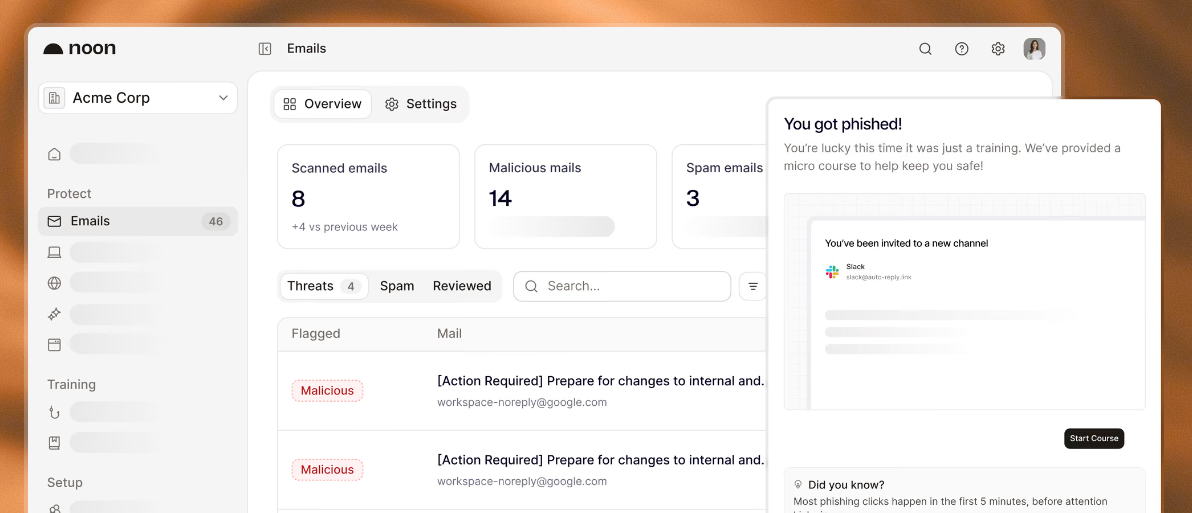
What it does: Noon is Aikido Security’s workforce security platform. Aikido secures the software a company builds; Noon secures the people building it. Email protection detects and removes the phishing and business email compromise native filters miss. AI governance shows which AI tools and MCP servers employees connect and keeps sensitive data out of prompts. Device protection covers what installs on employee laptops, from malicious packages to agent skills. Simulations and training rehearse staff against deepfake calls and QR phishing.
Why it stands out: Among these alternatives, Noon is the only one that also sees what employees install on their devices and which AI tools they connect. The others stop at the inbox, some adding archiving or training. The bigger draw is having email, devices, AI use and training in one platform that shares context, instead of separate consoles that never compare notes, with lessons reaching people in Slack, Teams or the Noon app.
What to know: Noon covers email, simulations, training, device protection and AI governance, but archiving, continuity, outbound encryption and wider data governance need their own decision. The email connection starts read-only; moving messages needs extra permission, and uncertain messages stay a team decision. Device protection and AI monitoring need the agent on macOS or Windows. Pricing is free for up to 10 users.
2. Proofpoint Core Email Protection
For email protection alongside communications retention
What it does: Pairs behavioral analysis with threat intelligence to catch phishing and business email compromise. You can deploy it through the API or as a gateway, matching protection to your mail setup and investigation workflow.
Why it stands out: For an archive-dependent Mimecast replacement, you add Proofpoint Archive on top. It preserves business correspondence and handles retention, search, legal holds and export, while Proofpoint Discover extends investigation and eDiscovery. One needs to stop fraudulent mail; the other needs dependable access to years of correspondence.
What to know: Core and Archive answer different requirements, so price them together, including capture, archive migration, continuity and outbound services you rely on. Buying email protection does not move or preserve your existing archive on its own.
3. Abnormal AI Inbound Email Security
For behavior-based detection of impersonation and vendor fraud
What it does: Abnormal AI Inbound Email Security builds behavioral baselines for your employees and vendors, then flags messages that deviate from them using identity and content signals. It is aimed at the plausible request that arrives with no obviously malicious attachment, which a traditional filter waves through.
Why it stands out: Reads the history with the sender and the thread around the message. It works across Microsoft 365 and Google Workspace, with message investigation and plain explanations of why each one was flagged.
What to know: Keep the proposal specific. Inbound Email Security handles live email threats, so your existing Mimecast archive and any continuity or outbound-control requirement still need their own destination. Compare how administrators review disputed detections and release legitimate mail during normal operations.
4. Microsoft Defender for Office 365
Best for teams already operating inside Microsoft security
What it does: Defender for Office 365 Plan 2 adds automated investigation and response to Microsoft’s email security. It works through qualifying alerts and their related evidence, helping administrators deal with suspicious messages inside the same environment they already use.
Why it stands out: Many remediation actions wait for an administrator’s approval, while certain clusters of malicious mail qualify for automatic cleanup. That difference tells you who will watch the action queue and how fast the team can respond. Defender belongs on the shortlist when Microsoft already runs your daily investigation workflow, where the organizational fit can count for as much as another email-security console would.
What to know: Plan 2 needs an eligible subscription or add-on. Retention and archiving carry their own licensing and configuration, so confirm those rather than assuming Defender for Office 365 stands in for the whole Microsoft portfolio.
5. Check Point Email Security
Best for cloud email and collaboration protection with flexible enforcement
What it does: Check Point Email Security connects over the API and runs anywhere from monitoring to inline prevention. Its coverage reaches supported collaboration tools as well as Microsoft 365 and Google Workspace.
Why it stands out: The Email and Collaboration packages separate Advanced Protect from Complete Protect, which adds data-loss prevention, and Check Point lists archiving, managed incident response, DMARC email-authentication management and AI phishing training as further layers. This suits a replacement that has to follow messages and files into collaboration apps, with a say in where enforcement happens.
What to know: Build the comparison around the package and apps you actually select. An API connection can drive inline prevention, though it does not guarantee cleanup after delivery. Mimecast offers API deployment too, so focus the comparison on the apps and response work that actually change.
6. IRONSCALES
Best for teams focused on email response automation
What it does: IRONSCALES Email Protect pairs inbound threat detection with remediation that administrators can tune, and checks links and attachments as mail arrives. Its business plans connect to Microsoft 365 and Google Workspace without any MX record changes.
Why it stands out: The room to adjust automation matters when routine messages flood the queue but the ambiguous ones still need a human. Weigh how it handles false positives and restores wrongly blocked mail as part of everyday running.
What to know: Email Protect 360 adds encryption and data-loss prevention. Human Risk Management brings training and simulations with the right configuration, and managed-service packages differ from the direct business plans. Pin down what your proposal includes. If Mimecast currently runs an archive or continuity service for you, work out how those keep going after an email-protection change.
7. Barracuda Email Protection
Best for keeping several email services in one purchasing decision
What it does: Barracuda Email Protection Premium Plus covers email protection, cloud archiving, awareness training and attack simulations in one plan. Its published plans also add continuity and encryption. Data-loss prevention is available, with deployment options from the API to the gateway.
Why it stands out: That breadth matters when leaving Mimecast means keeping records access and outbound safeguards next to phishing protection. The cloud archive supports retention policies, search, legal holds and exports.
What to know: Confirm how your chosen deployment actually delivers each service you need. Training and simulations come as an add-on managed service for managed service providers, so check that against your own setup. Migrating historical archives, with their access permissions and retention settings, still takes planned work, and buying an archive does not carry your existing records across by itself.
8. KnowBe4 Defend
Best for connecting live inbox protection with employee learning
What it does: KnowBe4 Defend combines behavioral threat detection with in-context warnings and coaching on suspicious messages. It offers inline or API deployment and investigation tools for administrators.
Why it stands out: Add Security Awareness Training when the replacement should include a broader curriculum and simulations. That named combination fits buyers who want their email defense and their ongoing learning program from the same vendor.
What to know: Deployment behavior changes with the platform. The documented Gmail flow sends dangerous messages to Junk, while Microsoft setups use quarantine-based flows, so confirm the environment and response settings you need. Spell out any other KnowBe4 products you expect, such as outbound controls or response tooling, because the Defend-plus-training combination does not automatically cover every Mimecast service you have today.
How to choose a Mimecast alternative
Start with the responsibilities behind the subscription. Document the mailboxes being protected, the services other teams use and the employee risks the new purchase should address. That makes it easier to distinguish a focused email replacement from a wider workforce security project.
Then check three practical areas:
· Coverage that must continue. Include archive access, new-message capture, retention, continuity, encryption and outbound data controls where required. Assign an owner to each.
· Daily operating work. Establish who reviews quarantined mail, handles employee reports, releases legitimate messages and updates policies. Ask to see those tasks using your proposed configuration.
· The full cost of the change. Include required products, archive export or import work, deployment support and overlapping subscriptions during transition. A lower headline price is useful only when the services meet the same requirements.
If your team also owns laptops and AI usage, bring those needs into the decision. The case for Noon is stronger when its workforce controls address work the team already manages across separate tools.
Migrating from Mimecast to Noon Security
Map the functions that will move
Identify the email, simulation and training functions Noon will take over, together with the device and AI policies you want to introduce. Record which Mimecast services will remain or move elsewhere. Involve the people responsible for records before changing archive capture or access.
Confirm the deployment design
Review the Google Workspace or Microsoft 365 connection, required permissions and agent rollout for supported employee devices. Agree a supported transition design with the vendors. Two products connecting to the same workspace does not establish that parallel enforcement will behave correctly.
Carry forward the operational knowledge
Document important allowlists, reporting routes, escalation rules and legitimate business senders. Recreate the relevant settings in the new system and assign owners. Plan explicitly for training records and archive data rather than assuming automatic policy conversion or import.
Stage the migration
Use a representative group that includes the employees and workflows most likely to expose gaps: finance, executives, shared mailboxes and frequent external collaborators. Check delivery, threat handling, legitimate-message release and employee reporting. Keep a rollback route and retire overlapping services after their replacement functions work as intended.
Bring workforce protection to your team with Noon
A Mimecast renewal is an opportunity to connect email security with the people, devices and AI tools around it. Noon brings those responsibilities together while giving employees relevant practice for the attacks they encounter.
Book a Noon Security demo to discuss the email, training, device and AI requirements your team wants to manage together, or request early access. Keep archive and continuity decisions explicit as you plan the change.


