

Cloud Security Posture Management (CSPM) is one of the fastest-growing components of any cloud security program. At its core, CSPM scans your live cloud environment to detect misconfigurations, risky permissions, and gaps that attackers commonly exploit. Unlike static checks in code, CSPM tells you what your cloud actually looks like right now — which makes it indispensable and, at the same time, urgent.
Why CSPM matters (and how it differs from IaC scanning)
There are two related ways to find cloud problems:
- Infrastructure-as-Code (IaC) scanning inspects templates and manifests before you deploy. It prevents mistakes from ever reaching production.
- CSPM inspects runtime, deployed resources via cloud APIs or agents. It finds what’s actually running today — and therefore what an attacker could abuse immediately.
Both are important. IaC scanning reduces risk earlier in the lifecycle. CSPM reduces risk where it matters most: in the live environment. The trade-off is obvious — CSPM alerts mean something is already misconfigured (and possibly already exploited), so prioritization and remediation matter even more.
What CSPM tools look for
CSPM rules vary by vendor, but common categories include:
- Publicly accessible data stores — open S3 or object buckets that leak secrets or records are a perennial source of breaches.
- Over-permissive IAM roles — compromised credentials plus broad permissions = rapid, high-impact escalation.
- Network ingress/egress mistakes — security groups or firewall rules that allow overly broad access.
- Missing or misconfigured logging — CloudTrail/CloudWatch (or equivalents) not enabled or not retained properly.
- Container and Kubernetes misconfigurations — dangerous defaults, privilege escalation paths, or exposed control planes.
- Compliance mapping & reporting — many CSPMs produce SOC 2, HIPAA or regulatory reports to support audits.
These checks are usually grouped by severity (low/medium/high/critical) and by framework (CIS, industry standards, or custom company policies).
Agent vs agentless: deployment models and trade-offs
CSPM tools typically operate in one of two modes — or a hybrid of both:
- Agentless (API-based): the tool authenticates to cloud APIs and enumerates resources. Advantages: no software running on your VMs; easier to deploy. Downsides: needs deep, up-to-date knowledge of each cloud provider’s APIs, and you must trust the provider’s access level and handling of API credentials.
- Agent-based: a small agent or collector runs in your environment and reports telemetry back to the vendor. Advantages: deeper visibility into runtime behaviors and local configuration. Downsides: you run third-party code inside your environment and have to manage updates.
Choosing between them depends on your threat model, appetite for third-party software in production, and need for deep runtime telemetry. For many teams, a hybrid approach (API-first with optional agents for sensitive workloads) provides the best balance.
Tools in the wild: open source and commercial options
There’s a healthy ecosystem of tools you can choose from. Two useful examples illustrate the space:
Prowler (open source)
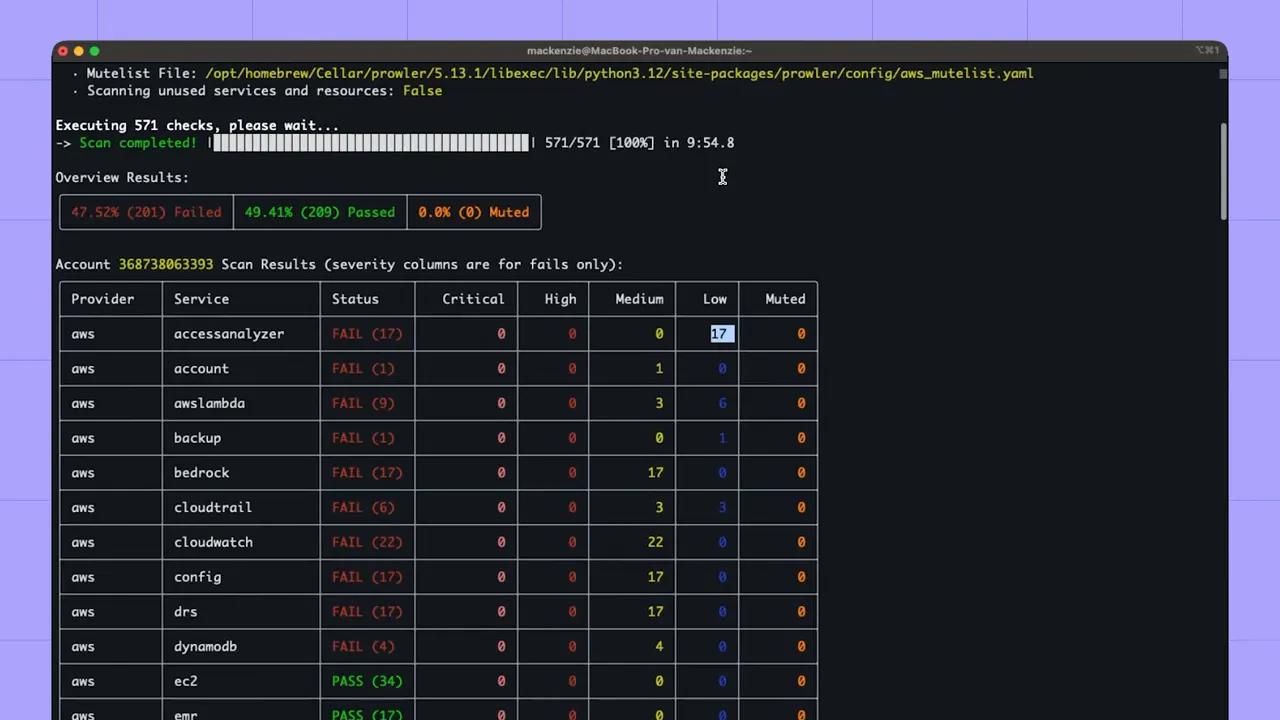
Prowler is a CLI-focused, AWS-centric audit tool that runs checks via AWS APIs and produces pass/fail outputs across CIS and other benchmarks. It’s lightweight, quick to get running, and useful for automated scans in CI or ad-hoc assessments.

When run, Prowler enumerates rules and returns a breakdown of failures, including severity categories and which framework checks failed.
Commercial CSPMs (example platform UI)
Commercial CSPMs provide broader integration, multi-cloud support, dashboards, compliance reports, and prioritization features. They typically map failed checks to assets, show historical trends, and let you search and triage issues across accounts.
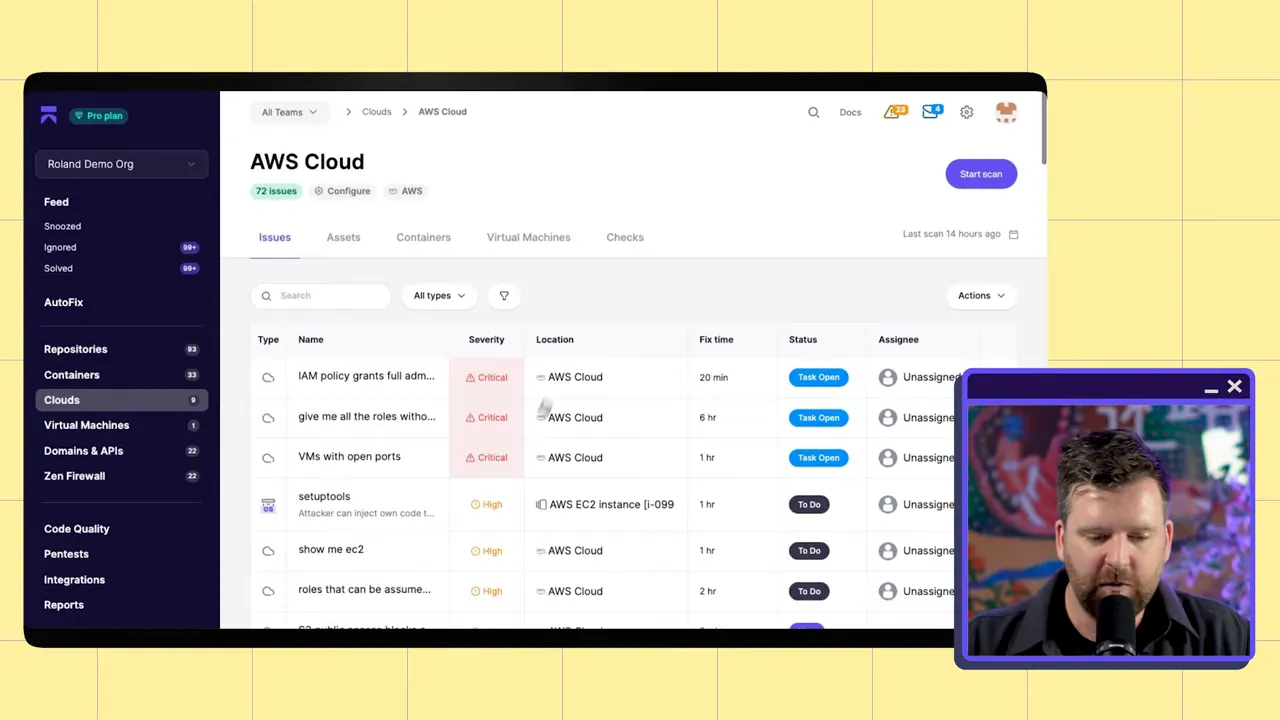
These platforms make it easier for teams to understand the blast radius of a misconfiguration and to generate audit-ready reports for SOC 2, HIPAA, or internal risk reviews.

From assets to action: visibility, search, and custom rules
Good CSPM tooling does two things well:
- Map assets and surface context — list every bucket, VM, container, and role, and make it searchable so engineers and security teams can find what matters quickly.
- Offer flexible policies — standard checks, optional advanced checks, and the ability to author custom policies.
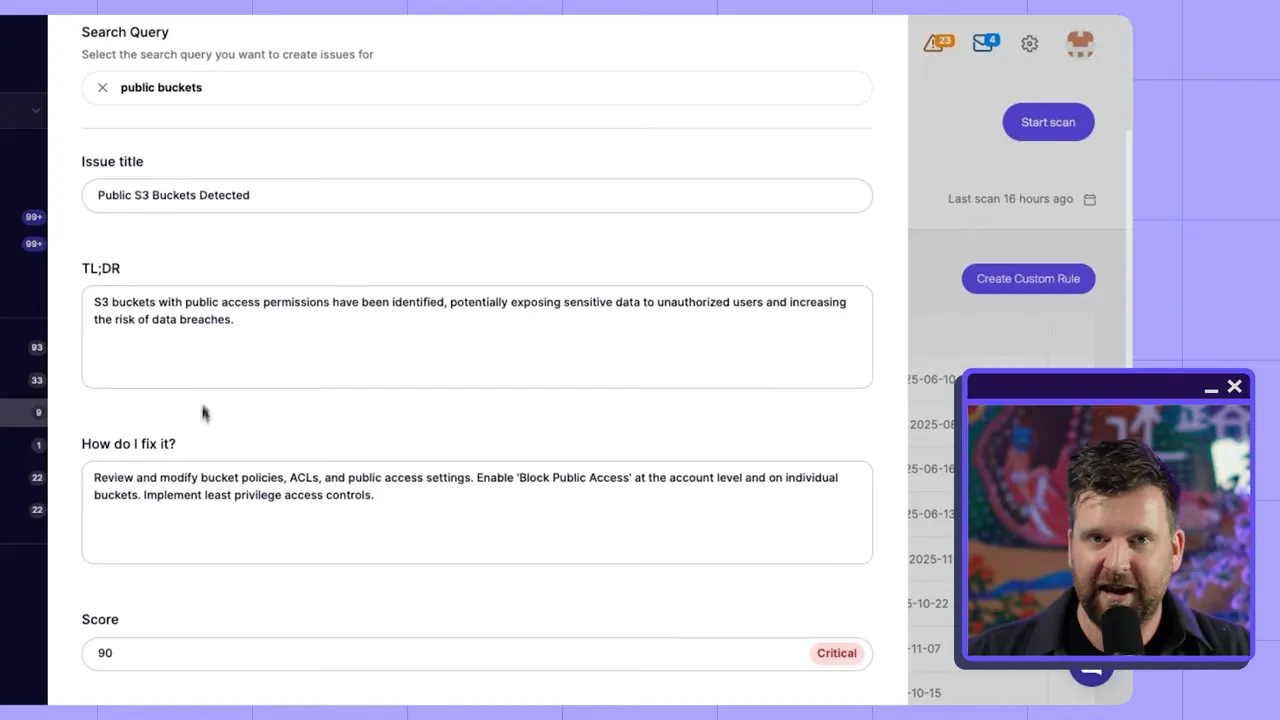
Modern vendor platforms increasingly support natural-language searches and even natural-language policies to build custom rules. That means you can ask for "public buckets" or "instances with open SSH" in plain English and create targeted policies without learning a new DSL.
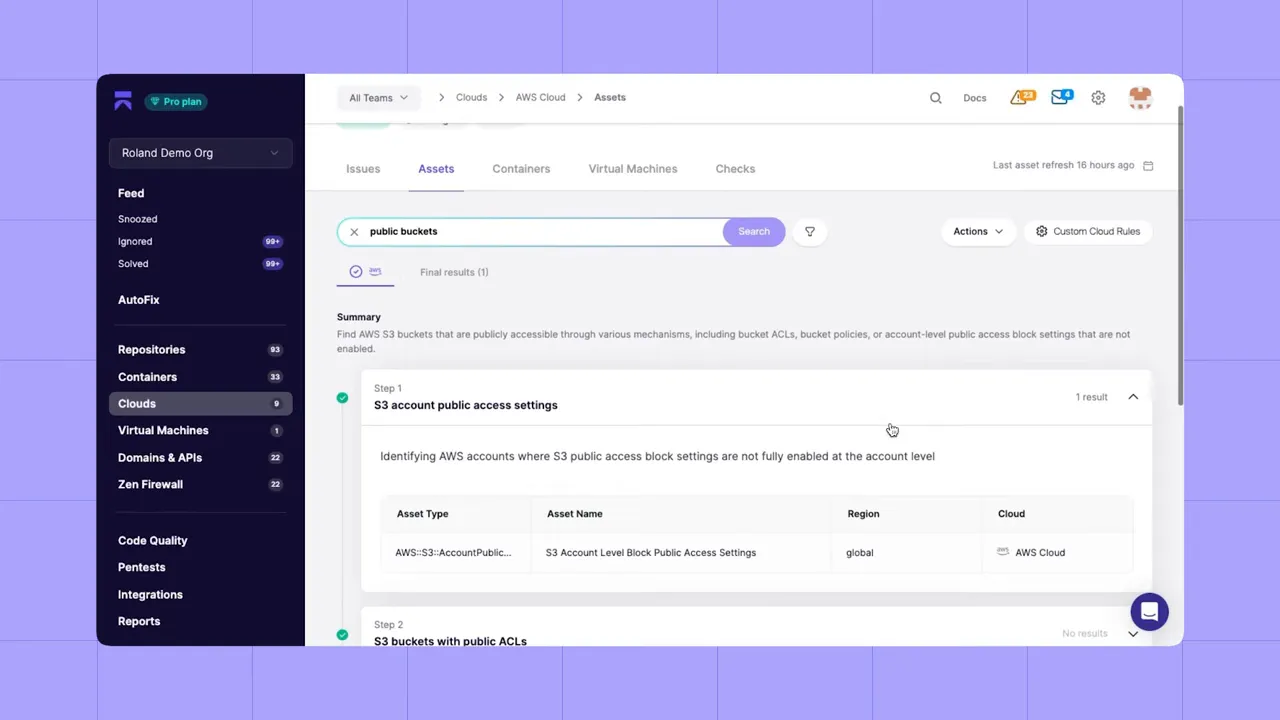
AI-assisted rule creation accelerates coverage for org-specific patterns while lowering the barrier for engineering teams to participate in security policy creation.
Practical checklist: getting started with CSPM
Implementing CSPM is straightforward conceptually, but requires careful choices. Use this checklist as a practical starting point:
- Inventory cloud accounts and decide scope: start with production, then add staging and developer accounts.
- Pick a deployment model: API-first agentless for broad coverage; add agents where deeper runtime telemetry is required.
- Run baseline scans with an open-source tool (e.g., Prowler) to get quick wins and familiarize teams with outputs.
- Evaluate commercial vendors for multi-cloud support, reporting, asset search, and custom-policy capabilities.
- Map CSPM findings to your triage process: define who owns remediation, SLAs for critical issues, and automated fixes where possible.
- Enable compliance reporting and integrate with your audit workflow to reduce manual evidence collection.
- Iterate: tune advanced checks, add custom rules, and integrate CSPM alerts into your ticketing and incident systems.
Limitations and what CSPM won’t do
CSPM is powerful, but not a silver bullet. Know the limitations:
- It discovers misconfigurations — not all runtime attacks. CSPM should be paired with runtime detection (EDR, cloud IDS) and application-layer testing.
- Agentless tools can have blind spots if they don’t fully implement provider APIs or newer services.
- Alerts require context — without reachability analysis and ownership metadata, teams can get overwhelmed by noise.
Final thoughts
CSPM is a core building block for modern cloud security. It gives security and engineering teams a consistent view of what’s actually deployed, speeds up remediation, and supports compliance. Combine CSPM with IaC scanning, runtime monitoring, and solid incident response to build a resilient cloud security posture.
Quick start
- Run an immediate scan with a lightweight tool (Prowler) to uncover quick wins.
- Deploy an API-based CSPM across accounts for baseline coverage.
- Add agents or more advanced checks where you need deeper visibility.
- Use custom policies and natural-language search to make security accessible to developers.
Secure what’s running. Prevent what you can. Prioritize what matters.
If you’re evaluating CSPM tools, look for multi-cloud support, flexible deployment models, good asset search, compliance reporting, and the ability to author and tune custom rules. Those capabilities determine whether a CSPM becomes a help or a new source of noise. Try out Aikido Security today!
Appendix: sample policies, commands, and triage playbook
Use these snippets as drop-in guidance to accelerate CSPM adoption and remediation.
Quick Prowler run (after cloning the repo)
cd prowler
# run all checks and output CSV for triage
./prowler -M csv > prowler-results.csv
Example natural-language policy
Use this as a template for tools that accept plain-English policies or for documenting custom rules:
Policy: Public storage buckets
When: any object store bucket is accessible to everyone (public-read or public-write)
Action: mark as critical, notify owner, and create ticket for remediation
Remediation: set bucket ACL to private and require MFA delete where available
Sample custom rule (concept)
A simple rule to detect over-permissive roles; expressible in most CSPM custom-rule formats:
if iam_role.permissions contains "*" and iam_role.trust_policy allows "*" then
  severity = high
  message = "Over-permissive role allowing privilege escalation"
end
Triage playbook (critical findings)
- Owner identification: use asset tags or cloud account mapping to find the responsible team.
- Immediate mitigation: if data exposure, revoke public access or rotate credentials.
- Create ticket: include CSPM finding ID, asset ARN, severity, and suggested remediation steps.
- Post-remediation validation: re-run CSPM checks and record evidence for audits.
- Retrospective: add IaC guardrails to prevent recurrence and update runbooks.


