

When people talk about application firewalls, they tend to lump a bunch of different things together under one umbrella. But not all firewalls are the same, and understanding the differences between them is important, especially if you're trying to figure out what protection your application actually needs.
So let's break it down. There are three main layers of application security you should know about: WAFs, in-app, and in-kernel. RASP and some ADR are in-app, while lower-level eBPF-based ADR are in-kernel. They all have the same broad goal of stopping bad things from happening to your app, but the way they go about it is very different. In short, WAF sees the request, in-app sees the code, and in-kernel sees the OS.
Which one do you need? Well, if you want the strongest possible security posture, most likely more than one. In this article, we’ll explain what WAFs, RASP, ADR, and eBPF are, what each one is most effective at, and help you to decide which of them you need.
WAF VS RASP VS ASP: How do the three layers of application security work?
Application security tools operate at three different levels, and each catches things the others can't.
WAF: edge security
WAFs sit outside your application entirely, inspecting incoming HTTP traffic before it ever reaches your app. No app context, but great for high-volume threats.
In-app runtime security: inside the app
In-app security instruments hook into your application directly. It hooks into your code's execution, traces how user input flows through your app, and can block attacks at the exact point where they become dangerous, before a malicious payload hits your database driver or spawns a shell. Because it has a full application context, it's precise. RASP tools, a subcategory of ADR, fall into this category.
In-kernel runtime security: below the app
In-kernel runtime security tools sit below your application entirely, at the OS level. Instead of hooking into app code, it watches every syscall made by every process on the host. It has no idea what your app logic is doing, but it sees everything at the OS level, including what happens after an attacker has already gotten in. eBPF-based ADR tools fall into this category.
We’ll first look at WAF, then in-app and in-kernel through the lens of RASP and ADR.
What is WAF?
A WAF (Web Application Firewall) sits outside your application, at the edge. Before a request even reaches your app, the WAF intercepts it and checks it against a list of known attack patterns like SQL injection strings, malicious headers, or suspicious URLs. If something matches a pattern, it gets blocked.
Where WAFs really are irreplaceable is in volumetric attacks, like DDoS traffic, bot floods, and scrapers. WAFs are built for high-volume, brute-force stuff. Cloudflare, for example, is extremely good at absorbing large-scale attacks before they ever interact with your infrastructure. They're also easy to deploy. Mostly a DNS or proxy change, no code to write, nothing to install inside your app. WAFs are also very configurable with custom rules, allowlists, and rule-tuning, and you can also decide whether to block something sus or just detect it.
The catch is that a WAF has no idea what happens once a request gets through the door. It can spot a suspicious-looking payload, but it can't tell you whether that payload is actually going to do anything dangerous because it has no idea what your app is actually going to do with a request. It sees traffic coming in, pattern-matches against what it has been configured to stop, and makes a call on whether to block it.
As a result, false positives are a real problem, and it can easily overblock requests. A user can search for something that happens to look like SQL and gets blocked, while a smart attacker encodes their payload differently and gets through. And if a WAF wants to stop a malicious user, it blocks their IP. Then an attacker can just use a VPN to get around it. But if you then try to block all traffic from the VPN, you block real users as well.
As a result, WAF tuning is an ongoing process where you tighten rules, watch for false positives, and loosen where needed. It's one of the reasons WAFs can be high-maintenance compared to RASP, which needs far less ongoing tuning because it has the app context to make better decisions without manual intervention.
Examples: Cloudflare, AWS WAF, Imperva
Open source: ModSecurity (via OWASP)
What is RASP?
RASP (Runtime Application Self-Protection) and in-app ADR are runtime security that lives inside your app and monitors it from within as it executes, instead of sitting outside your app inspecting incoming traffic like a WAP.
To understand why this matters, you need to know about sinks. A sink is a function— in your code, a library, or a built-in module, where user input stops being data and gets executed as something meaningful. We can look at a SQL injection as an example. An attacker puts malicious code in a form field, which flows through your application, hits your database driver (some db.query()), and at that point, it stops being text and becomes a command. That query function is the sink. What in-app security tools like RASP do is hook into those sinks and watch as input moves through the app, tracing it all the way to the dangerous function.
Because these in-app tools are running, well, inside your app, they know what the input is, where it came from, and where it's going. Instead of guessing whether ' OR 1=1-- is an attack or a legitimate search string, an in-app tool knows this specific string came from req.body.user, was concatenated unsanitized, and is about to hit a pg.query() call. Block it!
False positive rates are much lower than WAF and eBPF-based ADR because it's not just blindly pattern matching. It can block a user ID rather than just an IP, so an attacker can’t just use a VPN. And because it traces data flow rather than matching known signatures, it can catch new attack payloads that no one's seen before. Solid zero-day coverage for injection-class attacks!
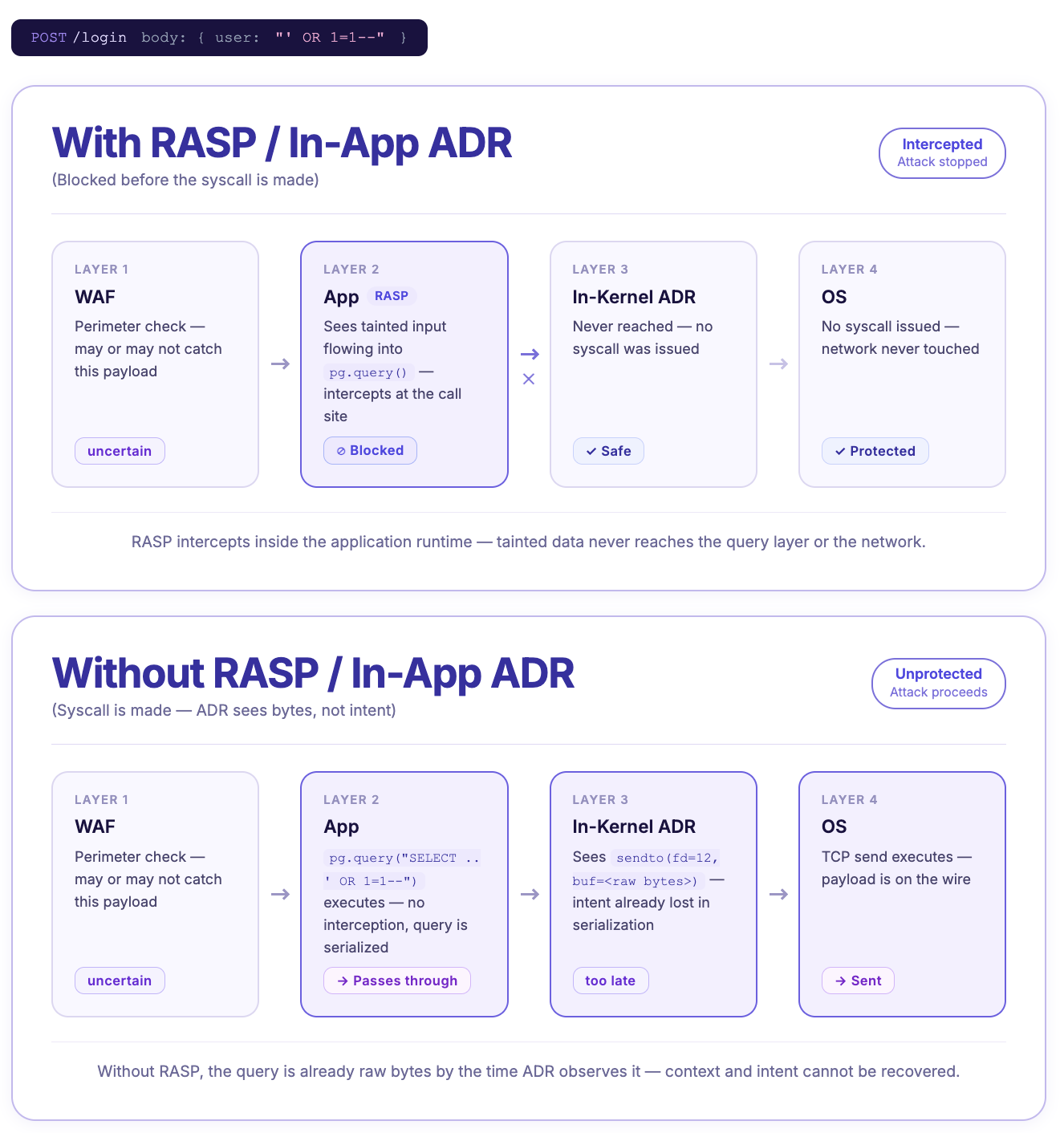
RASP and in-app ADRs also cover third-party dependencies. You can sanitize your own code perfectly, but if a library you're using has a vulnerability, that's out of your control (if your SCA didn’t scanner also didn’t catch it). RASP operates at the sink level regardless of where the code came from.
The one primary limitation of in-app security is that if an attacker bypasses the runtime entirely, through a native addon or a direct syscall, the hooks never fire. And once a shell is spawned, RASP sees the initial call but not what happens inside that shell afterwards. That's where the third layer comes in.
Examples: Aikido Zen (open source and paid version)
What is ADR?
ADR (Application Detection and Response) is the broader modern category that RASP falls under. All RASP is ADR, but not all ADR is RASP. The term ADR covers any tool that monitors and responds to attacks at runtime, whether that's from inside your application or below it entirely.
In practice, ADR tools are split into two flavors. In-app ADR (what RASP has always been) sits in your application directly and has full code-level context. Everything covered in the RASP section above about in-app security applies here. ADR also implies a broader scope than RASP, whereas RASP is primarily a blocking tool, ADR encompasses detection, visibility, and incident response capabilities too. Not every ADR tool does all of this, but it's the direction the category is moving.
The other type of ADR, in-kernel ADR, or eBPF-based ADR, takes a different approach to protect apps. Instead of hooking into your app, it sits at the Linux kernel level and watches every syscall made by every process on the host. It doesn't know anything about your app's logic, but it sees everything at the OS level.
Once an attacker has spawned a shell, in-kernel ADR provides the next level of visibility post-exploitation that in-app ADR can’t see. In-kernel ADR sees every command that runs inside that shell, like file reads, network calls, and lateral movement. If an attacker bypasses the runtime entirely, ADR still sees the execve regardless of how it was triggered. In practice, the most common scenario for Node.js apps is a malicious native addon slipping in through a supply chain attack (a compromised dependency that includes native code your runtime doesn’t inspect).
eBPF (Extended Berkeley Packet Filter) is the underlying kernel technology that powers in-kernel ADR tools. eBPF lets you attach a safe monitoring program to the Linux kernel that can watch specific events happening at the OS level, without touching the kernel itself. Normally, if you want to add custom monitoring or logic at the kernel level, you'd have to either modify the kernel's source code directly (risky, complex) or write a kernel module (also risky since a bug can crash the whole system). eBPF gets around that by letting you inject small programs into the kernel that run in a sandboxed environment. These programs observe specific syscalls and report back to the ADR tool, which then decides whether to allow or block the action.
The tradeoff with in-kernel ADR, like WAF, is that it has no app context. It sees raw syscalls, like "process 4821 ran a program", but has no idea which HTTP request or user triggered it. Without that context, in-kernel security has to work off policy instead, which are rules like "this process should never spawn a shell" or "this container should never write to this directory." That works for catching clear violations, but that makes it quite binary, so it doesn’t have nuance.
For injection-class attacks like SQL injection, in-kernel ADR is pretty much blind. By the time the attack reaches the syscall layer, the SQL payload is just raw bytes inside a network buffer. In-runtime exploits are another blind spot. Some attacks fire entirely inside the language runtime, so they never create an unusual OS-level operation until it’s too late.
Unlike old-school RASP tools, this type of ADR doesn’t require changes to your app code to set up. However, it has more setup and requirements than WAF or RASP because ADR tools generally need a relatively modern Linux kernel and elevated system privileges.
Examples: Tetragon, Falco, KubeArmor (open source)
Oligo ADR (commercial)
WAF, RASP, ADR, eBPF: Which One Do I Need?
By now, we’ve gone through a lot of terms— WAF, RASP, ADR, eBPF, in-app, in-kernel. The short answer is that you want protection at more than one layer. The longer answer depends on which layers. When it comes to RASP vs ADR, RASP is a subcategory of ADR, so the question becomes, do you want in-app security, in-kernel security, or both?
The different layers are complementary, not competing, because each catches things the others can't. That's why the answer to "WAF or RASP?" is usually "both", and adding in-kernel ADR on top gets you the post-exploitation and kernel-level coverage that rounds out the picture.
The three layers ask fundamentally different questions:
- WAF: "Does this HTTP request match a known attack pattern?"
- In-app security (RASP and ADR): "Is this user input about to hit a dangerous function in my app?"
- In-kernel security (ADR): "Did this process just do something it shouldn't have at the OS level?"
TL;DR: Get a WAF and an in-app security tool first. Get an eBPF-powered ADR later if you need specific kernel-level processing.
In-app security like RASP is the only layer that has any context about how the data is interacting with the specific app, so it’s the only layer that can do really precise blocking. So naturally, it has the fewest false positives compared to the other two. While in-app runtime protection can handle most application-level or injection attacks, WAF is needed for high-volume attacks, like DDoS. Because WAFs sit outside the application, they can handle thousands of bot requests before hitting your application and touching those resources, and this doesn’t require a ton of context to work. Together, in-app security like Aikido Zen combined with a WAF will cover the vast majority of the issues you’ll encounter.
If you're at the point where you need full post-exploitation visibility, are concerned about lateral movement, or need kernel-level policy enforcement across multiple processes, that's when to think about adding in-kernel ADR. It's the right tool for a more mature security setup, although not necessarily the first thing to reach for. Some in-app ADR tools cover more than others. Aikido Zen, for example, monitors outbound activity (SQL queries, shell commands, file reads, and outbound HTTP calls) that your app makes. And compared to a more complicated in-kernel ADR setup, teams can set up Zen with a single npm install and one line of code.

The only thing that in-kernel ADR covers beyond Zen is what happens after a shell has already been spawned and the attacker is operating at the OS level. So, Zen won't replace eBPF if you need that full post-exploitation visibility and kernel-level policy enforcement across all processes, but for most teams, it covers the attack surface that matters most (injection attacks, zero-days, and authorization logic). However, if you have a different RASP that doesn’t cover the outbound activity and SQL injections, you might need eBPF sooner.
Zen from Aikido: The modern in-app ADR
While they have similar goals, not all in-app security tools are the same. New ADRs like Zen, Aikido's open-source in-app firewall, sit in the in-app security territory but cover ground that a standard RASP tool doesn’t.
Zen provides the full app context of traditional RASPs, like taint tracing, sink-level blocking, user ID awareness, low false positives, but as a modern ADR, Zen also monitors outbound activity the way in-kernel ADR does. That includes every SQL query, shell command, file read, and outbound HTTP call your app makes. Its vulnerability algorithm is deterministic from the first request, so there’s no cold start problem and no ongoing rule maintenance that other RASPs have.
Zen also goes beyond injection-class attacks. It parses every SQL query at runtime using a full SQL parser (built in Rust) and enforces tenant scoping automatically. If a query is missing a tenant filter or uses the wrong tenant ID, Zen throws an error before it ships. IDORs (insecure direct object references) are the most common cause of cross-tenant data leaks in multi-tenant SaaS, and they're notoriously hard to catch in code reviews. Zen makes them impossible to accidentally deploy.
Further reading: Zero-day attack prevention for Node.js with Aikido Zen
Frequently Asked Questions
What is a WAF?
A WAF (Web Application Firewall) sits outside your application and inspects incoming HTTP traffic for known attack patterns. It's particularly good at handling volumetric threats like DDoS attacks and bot traffic, but it has no visibility into what your app actually does with a request.
What is RASP security?
RASP (Runtime Application Self-Protection) is a security tool that runs inside your application. It monitors how user input flows through your code and blocks attacks at the point where they become dangerous: the sink. Because it has full app context, it's much more accurate than a WAF for injection-class attacks.
What is the difference between WAF and RASP?
A WAF sits outside your app and blocks traffic based on patterns. A RASP sits inside your app and blocks attacks based on what your code is actually about to do with user input. WAFs are easier to deploy and great for volumetric threats. RASPs have lower false positive rates and better coverage for injection attacks and zero-days.
Do I need both a WAF and a RASP?
Yes, they're complementary, not competing. A WAF handles edge-level protection and volumetric traffic. A RASP handles the injection-class attacks and zero-days that WAFs routinely miss. Most mature security setups use both.
What is ADR vs RASP?
In general, ADR covers tools that provide either in-app or in-kernel security. RASP refers to in-app tools, and they are a subset of ADR. RASP and in-app ADR are technically the same approach, just different labels across time. The ADR label is newer and broader. Sometimes, ADR is used as shorthand for or interchangeably with eBPF, kernel-based ADR tools. The terms for RASP and ADR vary slightly depending on who you’re asking. Keep that in mind as you do further research on the subject.
What is ADR / eBPF in application security?
ADR (Application Detection and Response) covers both in-app and in-kernel security. In-kernel ARD tools like Tetragon or Falco operate at the Linux kernel level, watching every syscall across every process on the host. They're strong on post-exploitation visibility and catching kernel-level bypasses, but have no app context, making them complementary to RASP rather than a replacement for it. eBPF (Extended Berkeley Packet Filter) is the underlying kernel technology that powers in-kernel ADR tools.
If you sanitize all inputs correctly, then do I still need RASP?
Yes. Sanitization is hard to do all the time perfectly. Especially if SAST and code quality tools are missing during development, security bugs can find their way into the codebase. Think of it less as a replacement for good secure coding practices and more as a runtime backstop for when those practices aren't perfect (which in practice, of course, they never are). RASP also stops issues coming from third-party dependencies.


